TI-84 Calculator Online | TI 84 plus ce 2026
Every student who has scrambled for their Texas Instruments TI-84 Plus CE graphing calculator the night before an SAT, ACT, or AP Calculus exam — or whose family cannot justify the $130 cost of the device that College Board standardized tests, AP Statistics,
and high school mathematics curricula are built around — knows exactly what it feels like to be locked out of the most consequential mathematical tool in secondary education.
The free TI-84 calculator online on this page opens instantly in any browser on any device — Chromebook, iPad, Android, Windows, or Mac — delivering the complete TI 84 Plus CE experience:
full color graphing, statistical analysis, probability distributions, matrix operations, and TI-BASIC programming, with no download, no login, and nothing ever leaving your browser.
The basic TI 84 calculator online gives you full graphing, scientific, and statistical computing power right in your browser — Whether you're a student tackling algebra or a professional running data analysis, this free tool works on any device, anywhere.
Try our graphing TI 84 Calculator Online free — no download or login required. Start Calculating Now!
What Is the TI-84 Calculator?
The TI-84 is a graphing calculator made by Texas Instruments. It has been the standard calculator in American high schools and colleges for over two decades. Students use it in math, science, and standardized tests, including the SAT, ACT, and AP exams.
Its combination of graphing power, statistical tools, and programmability makes it unlike any basic scientific calculator. A Free TI 84 calculator online replicates the real device in your browser. You get the same buttons, the same functions, and the same graphing output — without buying the physical hardware.
History of the Texas Instruments TI-84
Texas Instruments introduced the TI-83 in 1996, and it quickly became a classroom staple. The TI-84 Plus followed in 2004 as a direct successor, offering more memory, faster processing, and USB port connectivity. The TI-84 Plus CE arrived in 2015, adding a high-resolution color screen, a rechargeable ti 84 calculator battery, and a thinner design.
Today, the TI-84 line remains the most widely used graphing calculator in the United States. It's approved for use on nearly every major standardized test, and most high school math curricula are designed around its functions.
Key Features of the TI 84 Calculator Online
This free ti84 calculator replicates the full feature set of the physical TI-84 Plus CE.
Graphing Capabilities and Zoom Controls
Graph up to 10 functions simultaneously in the Y= editor. Adjust the viewing window manually or use built-in zoom options: ZStandard, ZDecimal, ZSquare, ZInteger, ZTrig, and ZoomFit. Trace along curves to read coordinate values, find intersections, calculate derivatives, and locate maximum and minimum points directly on the graph screen.
Scientific and Advanced Math Functions
All standard scientific calculator functions are available: logarithms, exponential functions, powers, roots, absolute value, and trigonometric functions in both degree and radian mode.
The MATH menu provides additional tools for fractions, numeric derivatives, definite integrals, and equation solvers — everything you'd expect from a full ti 84 plus graphing calculator.
Statistical Analysis Tools
Enter data into lists (L1, L2, and so on) and run one-variable or two-variable statistics. Calculate mean, median, standard deviation, variance, quartiles, and regression models including linear, quadratic, exponential, power, and logistic. Scientific TI 84 Calculator Online,
The STAT PLOT menu lets you create scatter plots, histograms, box plots, and normal probability plots from your data.
Matrix Operations and Trigonometry
The MATRIX menu supports matrices up to 99×99. Perform addition, subtraction, multiplication, transposition, inversion, and determinant calculations. The calculator operates in degree, radian, or gradian mode — switchable from the MODE menu.
TI-BASIC Programming Support
Write and run TI-BASIC programs directly in the calculator. Create loops, conditionals, input prompts, and output statements.
This is particularly useful for automating repetitive calculations, building formula solvers, and understanding programming fundamentals. The newer ti 84 plus ce python edition expands this further with full Python support on the physical device.
No Download, No Login, Completely Free
There is nothing to install and no account to create. Open the page and the calculator is ready to use. It is free with no hidden fees, no premium tier, and no advertisements.
The free online ti 84 works on Chrome, Safari, Firefox, and Edge — on Windows, macOS, iOS, and Android.
Graphing Function Capabilities
The graphing engine is the core of the ti 84 graphing calculator, and the online version replicates it fully. The Y= editor accepts up to 10 functions simultaneously, each automatically plotted in a distinct color. Functions can be entered in standard notation using the calculator's keyboard or your physical keyboard.
Supported graphing modes include standard function graphing (Y= mode), parametric graphing (pairs of x(t) and y(t) equations), polar graphing (r as a function of θ), and sequence graphing (recursive and explicit sequences). Each mode has its own WINDOW settings, ZOOM behavior, and TABLE output.
The graphing window is fully adjustable through the WINDOW menu (set Xmin, Xmax, Xscl, Ymin, Ymax, Yscl manually) or through the ZOOM menu. ZOOM shortcuts include ZStandard (standard 10×10 window), ZDecimal (scale in 0.1 increments), ZSquare (equal x and y scales), ZInteger (integer-value tracing), ZTrig (trigonometry-optimized window), ZoomFit (auto-fits y-axis to the current x-axis range), ZoomIn, and ZoomOut.
The TRACE function moves a cursor along plotted curves and displays exact coordinate values. The CALC menu (2nd + TRACE) provides interactive tools for finding zeros, local minima, local maxima, intersections of two functions, numerical derivatives at a point, and definite integrals over a selected interval with the region shaded.
Scientific & Advanced Math Functions
The ti 84 plus calculator or TI 84 Calculator Online provides a complete scientific calculator environment beyond its graphing capabilities. All standard functions are accessible from the keypad or through menus.
Arithmetic and algebra: Addition, subtraction, multiplication, division, powers (^), roots (√(), absolute value (abs(), floor (int(), ceiling, modulo, and factorial (!). Fraction operations through the MATH → FRAC menu support converting decimals to fractions and mixed numbers.
Trigonometry: sin, cos, tan and their inverses (arcsin, arccos, arctan) in degree, radian, or gradian mode. Hyperbolic functions (sinh, cosh, tanh and inverses) through the MATH → HYP menu.
Logarithms and exponentials: Natural log (ln(), common log (log(), exponential function (e^(), and arbitrary base logarithms computed through the change-of-base formula.
Calculus tools: Numerical derivative nDeriv(f(x), x, a) and definite integral fnInt(f(x), x, a, b) through the MATH menu.
Equation solver: The MATH → Solver tool finds numerical solutions to equations of the form expression = 0, with user-specified initial guess and bounds.
Statistical Analysis Tools
The ti 84 statistics calculator functionality is among the most comprehensive of any graphing calculator at this level. Data entry through the STAT → Edit menu lets you fill lists L1 through L6 with up to 999 data points each. Once data is entered, the full statistical analysis suite is available.
One-variable statistics (1-Var Stats) computes: mean (x̄), sum (Σx), sum of squares (Σx²), sample standard deviation (Sx), population standard deviation (σx), count (n), minimum value, first quartile (Q1), median, third quartile (Q3), and maximum value. Two-variable statistics (2-Var Stats) extends this to paired datasets with correlation coefficients.
Regression analysis supports linear (two forms), quadratic, cubic, quartic, natural log, exponential, power, sinusoidal, and logistic models. Each regression outputs the equation of best fit with all coefficients and the correlation coefficient r (or r²). The result can be pasted directly into the Y= editor for graphing.
The STAT PLOT menu supports five plot types: scatter plot, xy-line plot, histogram, modified box plot, regular box plot, and normal probability plot. Plots can be overlaid with regression curves from the Y= editor for a complete visual analysis.
Color Screen Display
The ti 84 plus ce introduced a 320×240 pixel full-color display — a significant upgrade over the monochrome 96×64 screen of the ti 84 plus. The ti 84 plus ce online calculator renders the same color display experience in the browser.
Each function in the Y= editor is automatically assigned a distinct color, and curves on the graphing screen match their Y= color. This makes it visually straightforward to identify which curve corresponds to which equation when multiple functions are graphed simultaneously. Statistical plots similarly use color to distinguish data sets.
Menus, labels, and the calculator interface render in the CE's color scheme. The overall visual experience matches the physical ti 84 plus ce closely enough that students who practice on the online version will find the physical device immediately familiar.
Zoom Controls
The ZOOM menu provides 10 preset zoom modes and 4 additional zoom memory options:
ZBox — Draw a box on the screen to define the new viewing window. ZoomIn and ZoomOut — Zoom in or out from the cursor position by a factor defined in ZOOM → SetFactors. ZDecimal — Sets the window so each pixel represents 0.1 units, enabling clean decimal tracing. ZSquare — Adjusts the window so x and y scales are equal, preventing visual distortion of circles and other shapes.
ZStandard — Resets to the standard −10 to 10 window on both axes. ZTrig — Sets x-axis to −2π to 2π and y-axis to −4 to 4, optimized for trigonometric function graphing. ZInteger — Sets the window so TRACE snaps to integer x-values. ZoomStat — Automatically adjusts the window to display all data points currently stored in lists. ZoomFit — Fixes the x-axis range and automatically adjusts the y-axis to fit the minimum and maximum y-values of all active functions.
Web-Based
The ti 84 online is a web application. It runs in your browser using standard web technologies — HTML, CSS, and JavaScript. There is nothing to install, no operating system requirements beyond browser support, no app store involved, and no dependency on any third-party platform.
The calculator is delivered from a web server and runs entirely client-side once loaded. This means it works on any internet-connected device with a browser, including school-managed Chromebooks and institutional computers where software installation is restricted.
No Download or Login Required
Open the page. The calculator is ready. That is the complete setup process for the ti 84 calculator online free tool. There is no download button, no installer, no sign-up form, no email verification, no password to create, and no profile to manage. Students on a tight deadline can access a full graphing calculator ti 84 in seconds, without creating accounts or navigating onboarding flows.
Completely Free to Use
The free ti 84 calculator online will not charge you at any point. There is no free trial that expires, no basic tier with a paid upgrade, no "premium features" locked behind a subscription, and no in-calculator advertisements. Every mathematical capability — from basic arithmetic to full statistical hypothesis testing to TI-BASIC programming — is available at no cost, always.
Works on All Devices (Mobile & Desktop)
A single URL delivers the used ti 84 calculator online to any device. The same graphing calculator that works on a Windows desktop works on an iPad, an Android phone, a MacBook, and a Chromebook — with no separate app to download for any of them.
The interface is fully responsive and touch-compatible. Students who switch between devices (school Chromebook by day, iPhone in the evening) access the same tool with the same capabilities on each.
Exam Compatible
The physical ti 84 plus ce is approved for use on the SAT, ACT, AP Calculus AB, AP Calculus BC, AP Statistics, AP Chemistry, AP Physics, IB Mathematics, and most state standardized tests.
The ti 84 calculator online is the best practice tool for these exams because it trains you on the exact interface — the same key layout, the same menu trees, the same graphing behavior — that you will use with the physical device on test day.
Practicing on Desmos or a phone app means relearning the TI interface under exam pressure. Practicing on the ti 84 plus ce online eliminates that problem entirely.
Homework Help
The ti 84 online calculator is designed to be available whenever homework is. At any hour, on any device, students can graph functions, check answers, run statistical analyses, and work through calculus problems using the same tool their teacher demonstrated in class. The online version removes the most common homework obstacle — not having the physical calculator available — by making the ti 84 graphing calculator permanently accessible in the browser.
Research & Analysis
Beyond classroom coursework, the handheld ti 84 calculator nearby statistical suite is useful for light data analysis tasks. Researchers, students running simple experiments, and science fair participants can enter data into lists, compute descriptive statistics, run regression analyses, and visualize distributions using the STAT PLOT menu — all within the browser without specialized statistical software.
TI-BASIC Programming
The ti basic programming environment built into the ti 84 plus ce is available in the online calculator through the PRGM menu. Create new programs using the built-in program editor, which supports all TI-BASIC commands: Disp, Output(, Input, Prompt, If, Then, Else, End, For(, While, Repeat, Lbl, Goto, Menu(, ClrHome, and all mathematical and string operations.
Programs can automate repetitive calculations, build custom formula solvers, and run iterative computations. For students in computer science courses that use TI-BASIC as an introductory programming language, the ti basic calculator online provides a full development environment without needing the physical device.
Matrix Operations
The MATRIX menu supports the full range of matrix operations used in high school and college linear algebra. Create matrices of any size up to 99×99 and perform matrix addition, subtraction, and multiplication; scalar multiplication; transposition; inversion; and determinant calculation. 10 digits or 14 digits TI 84 Calculator Online Row operations (rowSwap, row+, *row, *row+) support manual row reduction. The ref( and rref) commands compute row echelon form and reduced row echelon form automatically, solving systems of linear equations in matrix form instantly.
Trigonometry Functions
All standard trigonometric functions are available: sin, cos, tan, arcsin (sin⁻¹), arccos (cos⁻¹), arctan (tan⁻¹). The MODE menu controls whether the calculator operates in Degree, Radian, or Gradian mode — a setting that must match the problem's requirements to produce correct results. Hyperbolic trigonometric functions (sinh, cosh, tanh and their inverses) are available through the MATH → HYP menu. The ZTrig zoom preset optimizes the graphing window for visualizing one or more complete periods of trigonometric functions.
Easy to Use
The ti 84 calculator online is designed for students, not engineers. The interface matches the physical ti 84 plus ce that students are taught to use in class, so there is no new learning curve. If you have used the physical calculator before, everything is in the same place. If you are new to the TI-84, the menu structure is logical and self-explanatory, and thousands of tutorials, YouTube videos, and classroom guides exist for the ti 84 graphing calculator that apply directly to the online version.
Download
While the ti 84 calculator online runs in your browser without a download, students who want an offline option have several paths. WabbitEmu is the most popular free ti 84 download for Windows desktop use. TilEm is available for Linux. On mobile, Graphing Calculator X84 (iOS and Android) and Calculate84 (iOS) are downloadable apps. For most students, however, the browser-based tool on this page — which requires no download — is the faster and more convenient choice.
Texas Model
The ti 84 plus ce is a Texas Instruments product — a company headquartered in Dallas, Texas, with a long history in the semiconductor and calculator industries. The texas instruments ti 84 line has been the dominant graphing calculator in the US education market for over 25 years. The ti 84 calculator sale is commonly called the "Texas calculator" in student slang, a reference to the Texas Instruments brand. This online tool replicates the texas ti 84 plus ce — specifically the current CE model — in a browser-accessible format.
Version Updates
The physical TI-84 Plus CE has seen several significant software updates since its 2015 release. Key versions include the addition of Python support (introduced with the Python Edition hardware and available as an OS update for existing CE units), improvements to the graph color engine, updates to the Python editor, and ongoing exam approval maintenance with College Board and ACT. The ti 84 calculator online is maintained to reflect the current standard CE feature set. New ti 84 calculator Major new features introduced in the physical ti 84 plus ce python edition — specifically Python programming — are physical-hardware-only capabilities and are not replicated in the browser version. All other CE capabilities are current.
How to Use the TI-84 Calculator Online
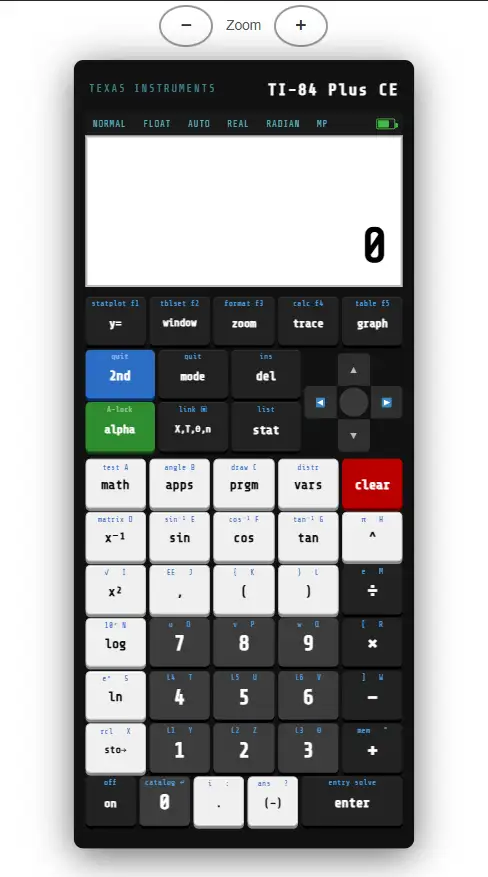
Getting started takes less than a minute. The interface mirrors the physical ti 84 plus ce calculator, so if you've used the real calculator before, everything will feel familiar.
Step-by-step guide:
- Open the calculator in your browser — no download or login required.
- The Home Screen appears, ready for input.
- Type any expression using the on-screen keypad or your physical keyboard.
- Press ENTER to calculate the result.
- To graph a function, press Y=, enter your equation, and press GRAPH.
- Use the WINDOW button to adjust the viewing range of your graph.
- Use the TRACE button to move along a graph and read coordinate values.
Why the TI 84 Is the Most Popular Graphing Calculator
Three factors drive the TI-84's dominance. First, exam approval: the College Board and ACT both permit it, so students have no reason to switch before a high-stakes test. Second, teacher familiarity:
Because teachers learned on Texas Instruments ti 84 calculators themselves, instruction and curricula are built around them.
Third, the ecosystem: decades of free programs, tutorials, and community resources exist for no other graphing calculator at the same scale.
Online TI-84 vs. Physical TI-84 Plus
The online version of the TI-84 is not a replacement for the physical calculator in every situation — but for most everyday math tasks, it is more convenient.
| Factor | Online TI-84 | Physical TI-84 Plus CE |
| Cost | Free | ~$100–$130 |
| Access | Any browser, any device | Must carry the device |
| Exam use | Not permitted at test centers | Permitted on SAT, ACT, AP |
| Graphing | Full support | Full support |
| Programming | TI-BASIC (limited) | Full TI-BASIC + Python (CE) |
| Internet required | Yes | No |
TI-84 Emulator vs. TI-84 Calculator Online
A TI-84 emulator is software that mimics the exact ROM of the physical calculator. Emulators are highly accurate but often require a ROM file, a software installation, and may raise legal questions.
A ti 84 calculator online — like this one — is a purpose-built web app that replicates the calculator's functionality without any of those complications. For homework, studying, and everyday math, the online calculator is the simpler choice.
TI-84 Online vs. Desmos
Desmos is an excellent free graphing tool, but it is not a TI-84. Students preparing for standardized tests need to practice on a ti 84 graphing calculator interface, because that is what they will use on test day.
Desmos also does not support TI-BASIC programming, matrix operations in the same format, or the statistical menus that the TI-84 provides. The Texas Instruments TI-84 online is the better choice when exam preparation, statistics coursework, or TI-specific curricula are involved.
How to Graph a Parabola on the TI-84 Plus CE
- Press Y= to open the function editor.
- Enter your equation, for example: X²+2X-3
- Press GRAPH to plot the parabola.
- Press WINDOW to adjust the X and Y range if needed.
- Press 2nd → CALC → Minimum or Maximum to find the vertex.
- Press 2nd → CALC → Zero to find the x-intercepts.
Tip: Use Zoom Fit (ZOOM → 0) to automatically scale the window to show the full shape of your graph.
10 Common Functions to Graph
| Function type | Y= entry |
| Linear | Y=2X+1 |
| Quadratic | Y=X²-4 |
| Cubic | Y=X³-3X |
| Square root | Y=√(X) |
| Absolute value | Y=abs(X-2) |
| Exponential | Y=2^X |
| Natural log | Y=ln(X) |
| Sine wave | Y=sin(X) |
| Rational | Y=1/X |
| Circle (parametric) | X=cos(T), Y=sin(T) |
TI-84 Programs and Apps
One of the most powerful aspects of the ti 84 plus is its programmability. Categories of popular TI-84 programs include:
Programs for the physical TI-84 Plus CE can be downloaded from sites like ticalc.org and transferred using TI Connect CE software.
Texas Instruments also maintains TI Activity Central, a free library of classroom activities for the ti 84 graphing calculator covering algebra, geometry, calculus, and statistics.
Who Benefits from the TI 84 Calculator Online?
Perfect For:
Students in High School and College
High school students in Algebra II, Pre-Calculus, Calculus, and Statistics use the ti84 graphing calculator daily. College students in engineering, physics, economics, and data science will also find the full statistical and graphing tools valuable. The ti 84 calculator online free version is especially useful for homework when the physical calculator is unavailable.
Teachers and Classrooms
Teachers can project the online ti 84 calculator online on a classroom screen to demonstrate techniques to the whole class. Education websites can embed the calculator directly on their pages so students have instant access during lessons. The online version removes the barrier of students not having their physical texas instruments ti 84 plus ce available during at-home instruction.
Parents
Parents helping their children with homework no longer need to hunt for a manual or remember how to use a ti 84 calculator online they last touched in school.
The texas instruments calculator ti 84 online is immediately accessible on any device.
Professionals
Engineers and scientists who need a quick graphing or statistical calculation can pull up the online ti 84 instantly. While professionals doing intensive data work typically use dedicated software, the TI-84 online is an excellent tool for fast, reliable calculations without launching a full application.
Students Without Access to the Physical Calculator
A physical ti 84 plus ce costs around $130 — a significant expense for many families. The free online version removes that cost barrier entirely. Students who cannot afford the physical calculator can still learn and practice on the exact same interface, preparing themselves fully for standardized tests and coursework.
TI-84, TI-84 Plus, and TI-84 Plus CE: What's the Difference?
The original TI-84 was never released as a standalone model — the product line jumped straight from the TI-84 Plus. The TI-84 Plus is the most widely recognized version, running on AAA batteries with a standard monochrome screen.
The TI-84 Plus CE is the modern flagship: thinner, lighter, with a full-color display and USB charging. All models run the same TI-BASIC programming language and support the same core math functions.
| Feature | TI-83 | TI-84 Plus | TI-84 Plus CE |
| Release year | 1996 | 2004 | 2015 |
| Screen | Monochrome 96×64 | Monochrome 96×64 | Color 320×240 |
| RAM | 24KB | 24KB | 154KB |
| Battery | 4× AAA | 4× AAA | Rechargeable |
| USB port | No | Yes | Yes |
| Python support | No | No | Yes (newer CE) |
| Exam approved | Yes | Yes | Yes |
| Typical price | ~$60 | ~$110 | ~$130 |
The TI-84 Plus CE introduced a high-resolution color screen that makes graphs clearer and easier to read. Its keyboard is color-coded to help students quickly identify function groups.
The rechargeable lithium-ion battery charges via a standard mini-USB cable and lasts for weeks on a single charge.
Why the TI-84 Is the Most Popular Graphing Calculator
Three factors drive the TI-84's dominance.
First, exam approval: the College Board and ACT both permit it, so students have no reason to switch before a high-stakes test.
Second, teacher familiarity: because teachers learned on Texas Instruments ti 84 calculators online themselves, instruction and curricula are built around them.
Third, the ecosystem: decades of free programs, tutorials, and community resources exist for no other graphing calculator at the same scale.
TI-84 Calculator — Desktop App for Mac and Windows (PC)
Students and educators who prefer a native desktop experience often search for a TI-84 calculator NEW desktop app for Mac or Windows PC.
While Texas Instruments does not officially publish a standalone desktop application for the TI-84, several options exist that bring the ti 84 plus experience to your computer screen.
WabbitEmu is the most widely used free desktop option for Windows. It runs a ROM image from an actual texas instruments ti 84 plus or ti 84 plus silver edition, replicating the physical device at the firmware level. Once you have a valid ROM — extracted from your own calculator using TI Connect CE — WabbitEmu behaves identically to the physical staples ti 84 calculator. For Mac users, WabbitEmu is available as a macOS build, though it requires more configuration than the Windows version.
TilEm is an open-source alternative that supports Linux natively and runs on Windows and macOS as well. Like WabbitEmu, it requires a ROM file. ti 83 84 calculator It supports the ti 84 plus, ti 83, and several other TI calculator models.
TI Connect CE is the official software from Texas Instruments for managing your physical ti 84 plus ce. It is not a standalone calculator, but it lets you manage files, programs, and apps on your physical device from a Mac or Windows PC. It includes a basic calculator interface for testing programs.
For users who do not want to deal with ROM files, software installation, or legal uncertainty, the ti 84 calculator online available on this page is the simplest desktop option. It opens in any browser on Windows or Mac, requires no installation, and delivers the same graphing and statistical capabilities as the physical texas instruments ti 84 plus ce. Many students use it full-screen in their browser as a practical desktop substitute.
Comparison: Desktop App vs. Online TI-84 Calculator
| Factor | Desktop App (WabbitEmu) | Online TI-84 Calculator |
| Installation required | Yes | No |
| ROM file required | Yes | No |
| Legal complexity | Moderate | None |
| Mac support | Partial | Full |
| Windows support | Full | Full |
| Accuracy | ROM-level exact | Functionally equivalent |
| Internet required | No | Yes |
| Cost | Free | Free |
| Best for | TI-BASIC program testing | Homework, studying, exams |
For the vast majority of students who need a ti 84 calculator for mac or a target ti 84 calculator for windows, the browser-based online ti 84 is the faster, simpler, and more accessible choice.
Calculate84 — Modern Graphing Calculator for iOS and iPad
Calculate84 is a dedicated iOS and iPad app designed to bring the TI-84 Plus CE graphing calculator experience to Apple devices. It is specifically built for iPhone and iPad users who want a ti 84 calculator online on their mobile device without carrying the physical hardware.
Calculate84 has been praised in educational technology circles for its faithful reproduction of the ti 84 plus ce color interface, its support for TI-BASIC program entry and execution, and its full graphing capabilities. The app is particularly well designed for iPad use, where the larger screen provides a comfortable display comparable to viewing the physical ti 84 plus ce screen.
Key features of Calculate84:
Calculate84 vs. the TI-84 online calculator
Calculate84 requires an App Store download and is exclusive to Apple devices. The free online TI-84 Plus CE graphing calculator on this page works on any device — iPhone, iPad, Android, Windows, Mac, or Chromebook patta — directly in the browser, with no download required.
For students who work across multiple devices or who use non-Apple hardware, the ti 84 calculator online provides more universal access. For dedicated iPad users who want an offline-capable solution with a polished native interface, Calculate84 is a strong option.
Graphing Calculator X84
The Graphing Calculator X84 is a popular iOS and Android app that emulates the TI-84 Plus CE experience on mobile devices. It is one of the most downloaded graphing calculator apps in app stores and is commonly found when students search for a ti 84 calculator on phone or a mobile alternative to the physical texas instruments ti 84.
The X84 app replicates the key layout, menu structure, and mathematical functions of the ti 84 plus ce graphing calculator. It supports function graphing, polar and parametric modes, the STAT menu for statistical analysis, the MATH menu for calculus operations, and matrix calculations. The interface is designed to feel familiar to anyone who has used a physical ti 84 graphing calculator, with the same color-coded keyboard layout and screen layout as the ti 84 plus ce.
Key features of Graphing Calculator X84:
How Graphing Calculator X84 compares to the online TI-84 calculator:
The X84 app requires downloading from the App Store or Google Play, while the free online ti 84 plus ce calculator on this page works instantly in any browser with no download.
The X84 app can work offline, which is an advantage in environments without internet access.
However, the online calculator works on any device, including Chromebooks, Windows PCs, and Macs — not just phones and tablets.
For students who need cross-device access without any installation, the ti 84 calculator online is the more convenient choice.
TI-84 Plus CE Online Calculator — Vernier
Vernier Software & Technology is an educational technology company well known in science classrooms for their lab sensors and data collection tools. Vernier has published resources and guides related to the TI-84 Plus CE calculator, particularly around using the calculator in conjunction with their Vernier data-collection systems.
Vernier's documentation covers how to use the texas instruments ti 84 plus ce to import and analyze sensor data, graph real-world measurements, and run statistical analyses on experimental results. Their resources are particularly relevant for students in AP Physics, AP Chemistry, AP Biology, and other lab-based courses that use both Vernier probes and ti 84 graphing calculators as part of standard lab procedure.
For educators looking for TI-84 Plus CE online resources connected to laboratory science, Vernier's website (vernier.com) maintains a library of compatible activities, tutorials, and software updates. Their DataQuest app for the ti 84 plus ce allows direct sensor data collection and graphing without a computer intermediary, making the calculator a standalone data analysis tool in the lab.
Students working in science courses that use Vernier equipment should be aware that the ti 84 plus ce online calculator in a browser does not support hardware connections to physical sensors — that capability is exclusive to the physical texas instruments ti 84 plus ce with the appropriate cable. However, for analyzing data already collected and running the statistical or graphical operations Vernier activities require, the online ti 84 functions identically.
FREE TI-84 Online Calculator
The free TI-84 online calculator on this page is straightforward: open your browser, navigate to the page, and the calculator is ready. No account. No credit card. No trial period. No premium tier. No advertisements embedded in the calculation interface.
The ti 84 calculator online free version includes the complete mathematics suite:
The free online ti 84 works on Chrome, Firefox, Safari, and Edge. It runs on Windows, macOS, ChromeOS, iOS, and Android. All calculations are private — nothing is sent to any server. There are no cookies and no tracking.
This is the same tool students use to prepare for the SAT, ACT, AP Calculus, AP Statistics, and other standardized tests. Practicing on the ti 84 online means you are training on the exact interface and key layout you will use on exam day with the physical calculator.
Texas Instruments: TI-84 Online — Free
Texas Instruments does not currently operate an official browser-based ti 84 online calculator at ti.com. What Texas Instruments does offer includes:
For students and teachers looking for an official texas instruments ti 84 online free tool, the closest option from TI is their emulator software, which requires installation and a ROM.
The web-based ti 84 calculator online free on this page fills the gap: it is independently developed to replicate the ti 84 plus ce interface and is available instantly in any browser without any affiliation with or endorsement from Texas Instruments.
What Texas Instruments recommends for online use:
Texas Instruments has, in partnership with College Board, supported the integration of certain digital tools for the digital SAT. However, the ti 84 plus ce physical calculator remains TI's recommended tool for standardized testing.
For home study and practice, texas instruments directs users to their Activity Central resources and the TI Connect CE software.
Students who want to experience the texas instruments ti 84 online interface without buying the physical calculator will find this browser-based tool the most practical free solution available.
TI-84 Plus CE Family Graphing Calculators — Texas Instruments
The TI-84 Plus CE family is Texas Instruments' flagship line of graphing calculators for education. Understanding the full product family helps students and parents choose the right model and understand what the ti 84 plus ce calculator online is replicating.
TI-84 Plus CE — The standard current model. Color screen, rechargeable battery, exam-approved. Silver TI-84 calculator. Available in multiple colors, including black, white, blue, purple, mint, teal, red, yellow, and pink. Runs TI-BASIC and supports a library of apps. This is the model this online calculator replicates.
TI-84 Plus CE Python Edition — An updated version of the CE that adds a MicroPython interpreter, allowing students to write and run Python programs directly on the calculator. All TI-BASIC functionality is retained. Approved for the same standardized tests as the standard CE.
TI-84 Plus CE-T — The European version of the TI-84 Plus CE, sold in the UK and continental Europe. Functionally identical to the standard CE with minor regional differences in exam approval status.
TI-84 Plus CE-T Python Edition — The European version with Python support.
TI-84 Plus (legacy) — The older monochrome model that preceded the CE. Still in use in many schools and still exam-approved, but no longer the primary model sold by Texas Instruments.
TI-84 Plus Silver Edition (legacy) — A previous premium version of the TI-84 Plus with additional memory and customizable faceplates. Discontinued but still in use.
| Model | Screen | Python | Battery | Current |
| TI-84 Plus CE | Color 320×240 | No | Rechargeable | Yes |
| TI-84 Plus CE Python | Color 320×240 | Yes | Rechargeable | Yes |
| TI-84 Plus CE-T | Color 320×240 | No | Rechargeable | Yes (Europe) |
| TI-84 Plus | Mono 96×64 | No | 4× AAA | Legacy |
| TI-84 Plus Silver Edition | Mono 96×64 | No | 4× AAA | Legacy |
All models in the TI-84 Plus CE family are approved for use on the SAT, ACT, AP exams, IB exams, and most state standardized tests.
The physical ti 84 plus ce graphing calculator is available at Target, ti-84 calculator Amazon, eBay, Best Buy, Staples, and most major retailers at a price of approximately $130 new.
Complete Mathematics Support — Comparison
The ti 84 calculator online supports the full mathematics curriculum from middle school algebra through advanced college coursework. Here is how each subject area is served, with a direct comparison to what the physical ti 84 plus ce graphing calculator provides.
📐 Algebra & Pre-Calculus
The TI-84 Plus calculator handles all core algebra and pre-calculus tasks students encounter from middle school through the first years of college. On the ti 84 calculator online, you can graph linear, quadratic, cubic, and higher-degree polynomial functions using the Y= editor.
The equation solver in the MATH menu handles single-variable equations of any form. Systems of equations can be solved using matrix row reduction or by graphing and finding intersections using the CALC menu.
Key algebra tools available on both the online and physical ti 84 plus ce:
The ti 84 online calculator replicates all of these functions identically to the physical device. Students preparing for the SAT math section, ACT mathematics section, or Algebra II coursework will find the online tool fully adequate for practice and homework.
Calculus & Analysis
For students in AP Calculus AB, AP Calculus BC, or college-level Calculus I through III, the ti 84 graphing calculator provides essential numerical analysis tools that are tested directly on exams.
The nDeriv( function computes the numerical derivative of any function at a specified point. The fnInt( function computes definite integrals over a specified interval. Both are accessible through the MATH menu and are among the most frequently used features in AP Calculus free-response sections, where the equation cannot be integrated or differentiated analytically.
The CALC menu accessed from the graphing screen provides interactive tools: find function values at a point, locate zeros, find local minima and maxima, calculate intersections of two functions, draw tangent lines, and compute definite integrals by shading the region under the curve. These visual tools help students connect symbolic calculus to graphical representations — a core competency tested on the AP Calculus exam.
Online vs. physical for calculus:
Both the ti 84 plus ce online calculator and the physical device provide identical numerical derivative and integral results. All CALC menu operations work the same way online.
The only calculus-related feature unavailable on the online version is connecting to Vernier sensors for real-time data collection. For all exam preparation, homework, and concept exploration, the online ti 84 is fully sufficient.
Statistics & Probability
Statistics is one of the most powerful use cases for the texas instruments ti 84 plus ce, and the online version replicates the full statistics suite.
Descriptive statistics: Enter data into lists L1 through L6. Use STAT → CALC → 1-Var Stats for one-variable summary statistics (mean, median, standard deviation, quartiles, min, max, sum) and 2-Var Stats for two-variable analysis.
Regression models: The STAT → CALC menu supports linear (LinReg ax+b and ax+b forms), quadratic (QuadReg), cubic (CubicReg), quartic (QuartReg), exponential (ExpReg), power (PwrReg), logarithmic (LnReg), sinusoidal (SinReg), and logistic (Logistic) regression. Each model computes the best-fit equation and can store it directly to the Y= editor for graphing against the scatter plot.
Probability distributions (DISTR menu): Normal (normalpdf, normalcdf, invNorm), Student's t (tpdf, tcdf, invT), chi-square (χ²pdf, χ²cdf), F-distribution (Fpdf, Fcdf), binomial (binompdf, binomcdf), Poisson (poissonpdf, poissoncdf), geometric (geometpdf, geometcdf).
Hypothesis tests (STAT → TESTS): Z-test, t-test, 2-SampZTest, 2-SampTTest, 1-PropZTest, 2-PropZTest, chi-square goodness-of-fit, chi-square independence, 2-SampFTest, LinRegTTest, LinRegTInt, ANOVA.
Online vs. physical for statistics:
The ti 84 plus ce calculator online and physical device produce identical results for all statistical calculations. The STAT PLOT menu for scatter plots, histograms, box plots, and normal probability plots works the same way online. AP Statistics students can complete all inference procedure practice on the free online ti 84.
Advanced Mathematics
Beyond standard high school curriculum, the ti 84 plus ce supports advanced mathematics that appears in college coursework.
Matrix algebra: The MATRIX menu supports matrices up to 99×99 elements. Operations include matrix addition, subtraction, multiplication, scalar multiplication, transposition (T), inversion (⁻¹), determinant (det(), and row reduction operations (ref, rref, rowSwap, row+, *row, *row+). These tools cover all standard Linear Algebra course requirements.
Complex numbers: Arithmetic with complex numbers is supported natively. The calculator can compute sums, differences, products, quotients, powers, and roots of complex numbers. The MATH → CPX menu provides absolute value (modulus), argument (angle), real and imaginary part extraction, and rectangular-to-polar conversion.
Parametric and polar graphing: Parametric mode supports curves defined by x(t) and y(t) equations — essential for modeling projectile motion, ellipses, cycloids, and other physics and engineering applications. Polar mode supports r(θ) functions, which appear in multivariable calculus and are tested in AP Calculus BC.
Sequence mode: Analyze recursive and explicit sequences, compute partial sums, and graph sequence behavior. This mode is useful for discrete mathematics, financial mathematics (annuities, amortization), and calculus courses that include series convergence.
Technical Specifications & Compatibility
System Requirements
The ti 84 calculator online runs entirely in your browser. There is no software to install, no operating system restriction beyond what your browser supports, and no minimum hardware requirement beyond what is needed to run a modern browser.
JavaScript must be enabled — it is enabled by default in all major browsers. No plugins, Flash, Java applets, or browser extensions are required.
Minimum requirements:
Once loaded, the calculator runs entirely in-browser. On devices with limited internet connectivity, the calculator continues to function as long as the page remains open.
Device Compatibility
| Device | Operating System | Browser Support | Touch Input | Notes |
| Windows desktop/laptop | Windows 10, 11 | Chrome, Firefox, Edge, Opera | N/A | Keyboard shortcuts supported |
| MacBook / iMac | macOS 11+ | Chrome, Safari, Firefox, Edge | N/A | Keyboard shortcuts supported |
| Chromebook | ChromeOS | Chrome | N/A | Full support |
| iPad | iPadOS 14+ | Safari, Chrome | Full touch | Landscape orientation recommended |
| iPhone | iOS 14+ | Safari, Chrome | Full touch | Landscape orientation recommended |
| Android tablet | Android 9+ | Chrome, Firefox | Full touch | Landscape orientation recommended |
| Android phone | Android 9+ | Chrome, Firefox | Full touch | Landscape orientation recommended |
| Linux desktop | Any modern distro | Chrome, Firefox | N/A | Full support |
The ti 84 online calculator is fully responsive. The interface scales automatically to any screen size, and all calculator keys are tappable on touchscreen devices.
On small phone screens, landscape orientation provides the best graphing experience by maximizing the display area available for the graph window.
Calculator Features
Graphing:
| Feature | Online TI-84 | Physical TI-84 Plus CE |
| Function graphing (Y=) | ✓ Up to 10 functions | ✓ Up to 10 functions |
| Parametric mode | ✓ | ✓ |
| Polar mode | ✓ | ✓ |
| Sequence mode | ✓ | ✓ |
| ZOOM controls | ✓ All standard zoom options | ✓ |
| TRACE | ✓ | ✓ |
| CALC menu (zeros, min, max, intersect, derivative, integral) | ✓ | ✓ |
| TABLE function | ✓ | ✓ |
| Color graph display | ✓ | ✓ |
Statistics:
| Feature | Online TI-84 | Physical TI-84 Plus CE |
| Data lists (L1–L6) | ✓ | ✓ |
| 1-Var and 2-Var Stats | ✓ | ✓ |
| All regression models | ✓ | ✓ |
| STAT PLOT (scatter, histogram, box, normal) | ✓ | ✓ |
| DISTR menu (all distributions) | ✓ | ✓ |
| STAT → TESTS (all hypothesis tests) | ✓ | ✓ |
Advanced:
| Feature | Online TI-84 | Physical TI-84 Plus CE |
| Matrix operations (up to 99×99) | ✓ | ✓ |
| Complex number arithmetic | ✓ | ✓ |
| TI-BASIC programming | ✓ | ✓ |
| Python programming | ✗ | ✓ (CE Python edition) |
| USB file transfer | ✗ | ✓ |
| Vernier sensor connectivity | ✗ | ✓ |
| Exam use (SAT, ACT, AP) | ✗ | ✓ |
Privacy & Security
The ti 84 calculator online is fully private by design. Every calculation, every program you write, and every graph you create stays entirely on your device. No data is transmitted to any server at any point during your session.
There are no analytics scripts logging your keystrokes, no session tracking, no persistent cookies, and no account system of any kind. Your work disappears when you close the tab.
This makes the free online ti 84 safe to use on school networks, corporate networks, library computers, and any environment with privacy or security requirements. There is no data collection to comply with, no terms of service requiring a minimum age, and no personal information gathered.
Comparison: TI-84 Calculator vs. Desmos Calculator
The TI-84 calculator and Desmos are the two most widely used graphing tools in American education. They serve overlapping but distinct purposes, and understanding the differences helps students and teachers choose the right tool for each situation.
What Desmos is: Desmos is a free, browser-based graphing calculator developed by Desmos Studio. It is renowned for its intuitive interface, beautiful graph rendering, and accessibility. The digital SAT now includes Desmos as a built-in tool through College Board's testing platform. Desmos is excellent for exploring function behavior, visualizing transformations, and working on tasks where graph appearance is the primary goal.
What the TI-84 is: The ti 84 graphing calculator is a physical (and now online-replicated) device that is the standard for American standardized testing outside of the digital SAT. It provides a complete mathematical environment including statistics, matrix algebra, TI-BASIC programming, and probability distributions — capabilities that go well beyond graphing.
| Feature | TI-84 Calculator Online | Desmos Graphing Calculator |
| Function graphing | ✓ | ✓ |
| Color display | ✓ | ✓ |
| STAT menu with lists | ✓ | ✗ |
| Regression models | ✓ (full suite) | ✓ (limited) |
| Probability distributions | ✓ (DISTR menu) | ✗ |
| Hypothesis testing | ✓ | ✗ |
| Matrix operations | ✓ | ✗ |
| TI-BASIC programming | ✓ | ✗ |
| Table of values | ✓ | ✓ |
| ACT exam approved | Physical only | ✗ |
| Digital SAT integrated | ✗ | ✓ |
| Interface familiarity for TI users | ✓ | ✗ |
| Learning curve for TI users | None | Moderate |
| Learning curve for new users | Moderate | Low |
| Mobile experience | ✓ | ✓ |
| Free | ✓ | ✓ |
When to use the TI-84 online calculator:
- ACT, AP Calculus, AP Statistics, or AP exam preparation
- Courses where the teacher uses TI-84 menus in instruction
- Statistics coursework requiring list-based data entry, regression, and hypothesis testing
- Matrix algebra and linear systems
- TI-BASIC programming assignments
- Any situation where you need to practice the exact interface you will use with the physical calculator
When to use Desmos:
- Digital SAT practice (Desmos is built into the exam)
- Exploratory graphing where visual beauty matters
- Quickly visualizing a function without needing statistics or programming
- Assignments or classes where Desmos is explicitly permitted or preferred
Verdict: For pure graphing exploration, Desmos is more intuitive and visually refined. For standardized test preparation (ACT, AP), statistics, and the complete mathematics toolkit that the TI-84 provides, the ti 84 calculator online is the appropriate tool. Many students benefit from using both: Desmos for conceptual exploration, the ti 84 online for exam preparation and statistical analysis.
Comparison: Desmos Scientific Calculator vs. Desmos Graphing Calculator
Desmos offers two distinct tools, and students frequently confuse them. Understanding the difference matters when choosing between Desmos and the ti 84 calculator.
Desmos Scientific Calculator is a non-graphing scientific calculator. It handles arithmetic, trigonometric functions, logarithms, exponents, roots, and basic algebraic operations. It displays input in a clean, readable format. It does not graph functions, does not work with data lists, and does not support statistics or regression. It is analogous to a physical scientific calculator like the Texas Instruments TI-30XS series, not to the ti 84 graphing calculator.
Desmos Graphing Calculator is the full graphing tool. It plots functions, supports inequalities, handles polar and parametric curves, provides a table of values, and supports sliders for parameter exploration. It is the tool integrated into the digital SAT. It does not include the STAT menu, the DISTR menu, hypothesis testing tools, matrix operations, or TI-BASIC programming that the ti 84 plus ce provides.
| Feature | Desmos Scientific | Desmos Graphing | TI-84 Online |
| Basic arithmetic | ✓ | ✓ | ✓ |
| Trig, log, exponents | ✓ | ✓ | ✓ |
| Function graphing | ✗ | ✓ | ✓ |
| Polar / parametric | ✗ | ✓ | ✓ |
| Table of values | ✗ | ✓ | ✓ |
| Sliders / parameters | ✗ | ✓ | ✗ |
| Data lists | ✗ | ✓ (basic) | ✓ (full) |
| Statistical regression | ✗ | ✓ (limited) | ✓ (full suite) |
| Probability distributions | ✗ | ✗ | ✓ |
| Hypothesis testing | ✗ | ✗ | ✓ |
| Matrix operations | ✗ | ✗ | ✓ |
| Programming | ✗ | ✗ | ✓ (TI-BASIC) |
| ACT / AP exam interface | ✗ | ✗ | ✓ |
| Digital SAT integrated | ✓ | ✓ | ✗ |
Key takeaway:
For the digital SAT, Desmos (scientific or graphing, depending on the section) is the built-in tool students will encounter. For the ACT and AP exams, the ti 84 graphing calculator interface is what students need to know.
For statistics and data analysis at any level, neither the Desmos tool comes close to the ti 84 calculator online's full statistical suite.
Students taking both the SAT and ACT — which describes most college applicants — benefit from familiarity with both Desmos and the ti 84 plus ce. The free online ti 84 makes it easy to practice the TI interface without owning the physical device.
Comparison: TI-84 Plus CE vs. TI-84 Calculator Online
The physical TI-84 Plus CE and the TI-84 calculator online are not competitors — they are complementary tools. Here is an honest, complete comparison of both.
What they share:
The ti 84 plus ce online replicates nearly every mathematical feature of the physical device. Both tools provide the same graphing engine (function, parametric, polar, sequence), the same ZOOM controls, the same CALC menu operations, the same STAT menus,
the same DISTR probability distribution functions, the same hypothesis testing suite, the same matrix operations, the same MATH menu including nDeriv and fnInt, the same TI-BASIC programming environment, and the same color display. Mathematical results are identical across both.
What only the physical TI-84 Plus CE has:
- In-person exam use. The physical ti 84 plus ce is permitted at SAT, ACT, AP, and IB testing centers. The online calculator cannot be used at in-person testing centers where phones and computers are prohibited.
- Python programming. The ti 84 plus ce python edition adds a MicroPython interpreter. The browser version does not support Python.
- USB connectivity. The physical device connects to computers via mini-USB for file transfer, OS updates, and app installation using TI Connect CE software.
- Vernier and CBL sensor connectivity. The physical ti 84 plus ce can connect to data-collection sensors for real-time lab data graphing.
- Offline use. The physical calculator requires no internet connection.
- App installation. Third-party apps (games, specialized tools) can be transferred to the physical device.
What only the online TI-84 calculator app has:
- Zero cost. The ti 84 calculator online free version eliminates the ~$130 purchase price.
- Instant access. No setup, no purchase, no delivery. Available immediately on any device.
- Cross-device availability. One URL works on every device. No separate purchases for phone apps.
- No battery concern. The online calculator never runs out of charge.
- Always current. No OS updates to manage.
| Factor | Physical TI-84 Plus CE | TI-84 Calculator Online |
| Cost | ~$130 | Free |
| In-person exam use | ✓ | ✗ |
| Python programming | ✓ (Python edition) | ✗ |
| USB file transfer | ✓ | ✗ |
| Sensor connectivity | ✓ | ✗ |
| Offline use | ✓ | ✗ (requires browser) |
| Function graphing | ✓ | ✓ |
| Full statistics suite | ✓ | ✓ |
| Hypothesis testing | ✓ | ✓ |
| Matrix operations | ✓ | ✓ |
| TI-BASIC programming | ✓ | ✓ |
| Color display | ✓ | ✓ |
| Cross-device access | ✗ | ✓ |
| Zero setup | ✗ | ✓ |
| Works on phone/tablet | ✗ | ✓ |
| Battery required | ✓ | ✗ |
TI-84 Plus CE Calculator Online
The TI-84 Plus CE calculator online specifically replicates the current flagship Texas Instruments model — the CE released in 2015 and continuously updated through the Python edition. The CE is the standard model in use in American classrooms as of 2025 and the most commonly required calculator for standardized testing.
Calculator Features
The ti 84 plus ce online renders the full color display experience of the physical CE. Graphs appear in color, with each Y= function automatically assigned a distinct color. The menu interface exactly matches the CE's layout: the same key positions, the same menu trees, the same secondary function access via the 2nd key. Students who learn on the ti 84 plus ce online will have no adjustment period when picking up the physical device for exam day.
All major CE capabilities are replicated: function graphing in all four modes, the complete statistics suite through STAT → TESTS, the DISTR probability distribution menu, matrix operations through the MATRIX menu, complex number support, and TI-BASIC programming through the PRGM menu. The MATH menu includes all standard mathematical functions including nDeriv, fnInt, the fraction tools, and the polynomial solver.
Educational Use
The ti 84 plus ce online calculator is purpose-built for educational environments. Teachers can project it on a classroom screen while students follow along on their own laptops, tablets, or phones — all running the same interface, the same key layout, the same menus. This synchronized classroom experience is not possible when students have different devices or apps.
For at-home and hybrid learning, the free online ti 84 plus ce ensures that students who forget their physical calculator, whose device is damaged, or who cannot afford the hardware can still participate fully in coursework. It also enables 24/7 access: a student working on homework at midnight does not need to find their physical ti 84 plus ce to continue.
For test preparation, the ti 84 plus ce calculator online is the most effective practice tool available. Students practice on the exact interface they will use with the physical calculator on test day, building muscle memory for key sequences, menu navigation, and the specific operations tested on the SAT, ACT, AP Calculus, and AP Statistics exams.
Is There a Free TI-84 Emulator?
Yes — and the answer depends on what you mean by "emulator." The word is used loosely to describe two different things: a true ROM emulator and a functional web calculator.
True ROM emulator: Software that runs the actual firmware extracted from a physical ti 84 plus or ti 84 plus ce. These replicate the calculator at the code level — every pixel, every calculation, every edge case. Examples include WabbitEmu (Windows/Mac), jsTIfied (browser-based, by Cemetech), and TilEm (Linux). All require a ROM image file, which you must legally obtain by extracting it from a
ti 84 calculator you own. Texas Instruments' license terms restrict redistribution of ROM files, putting many ROM downloads in a grey area legally. Setup is non-trivial for most students.
Functional web calculator (this page): A purpose-built web application that replicates the mathematical capabilities, interface layout, and menu structure of the ti 84 plus ce without using the original firmware. No ROM required. No installation. No legal questions. Open the browser and use it. The results for all mathematical operations — graphing, statistics, calculus functions, matrix algebra — are equivalent to the physical device.
For students who need a free ti 84 emulator for homework, exam practice, and coursework, the web calculator is the better practical option in almost all situations. The only reason to use a true ROM emulator is if you are developing or testing TI-BASIC programs at the firmware level and need absolute code compatibility — a need that applies to a small fraction of users.
Verdict: If you want to do math, use the free online ti 84 calculator on this page. If you are building apps for the physical device, investigate WabbitEmu or jsTIfied with a legally obtained ROM.
What Are the Best TI-84 Emulators?
Several TI-84 emulators are available across different platforms. Here is an honest assessment of each:
WabbitEmu (Windows, Mac) WabbitEmu is the most popular free desktop emulator for the ti 84 plus and ti 84 plus silver edition. It is open source, well maintained historically, and provides ROM-level accuracy. The setup process involves obtaining a ROM file from a physical calculator and loading it into the software. WabbitEmu supports sending programs to and from the emulator, making it useful for developers. The macOS version works but has historically lagged behind the Windows version in polish and update frequency. Best for: Windows users developing TI-BASIC programs.
jsTIfied (browser-based, by Cemetech) jsTIfied is a browser-based emulator from Cemetech, one of the leading TI calculator enthusiast communities. It supports multiple TI models including the ti 84 plus and ti 84 plus ce. Like WabbitEmu, it requires a ROM file. The advantage is that it runs in the browser without installation. The cemetech.net community also maintains an extensive library of TI-BASIC programs, games, and documentation. Best for: users who want browser-based ROM emulation and don't mind sourcing a ROM.
TilEm (Linux, Windows, Mac) TilEm is an open-source TI calculator emulator that supports a wide range of TI models. It is the go-to option for Linux users. Cross-platform support is available. Requires a ROM file. Best for: Linux users and cross-platform developers.
Graphing Calculator X84 (iOS, Android) The X84 app provides a ti 84 plus ce experience on mobile without requiring a ROM. It is a functional calculator app rather than a ROM emulator, similar in concept to the web-based ti 84 online on this page but distributed as a native app. Available on both iOS and Android. Best for: mobile users who want an offline-capable ti 84 graphing calculator app.
Calculate84 (iOS, iPad) Calculate84 is an iOS-exclusive app with strong reviews for its faithful ti 84 plus ce color interface reproduction and TI-BASIC support. Best for: Apple device users who want an App Store app.
This page — free online TI-84 calculator pink For students, parents, and educators who simply want to do math — no ROM files, no downloads, no setup — the financial ti 84 calculator online free on this page is the most accessible option. Works on all devices, all operating systems, all browsers. Instantly ready. Best for: everyone who just needs to calculate.
Free Online TI-84 Plus CE Graphing Calculator
The free online TI-84 Plus CE graphing calculator on this page is the most accessible web-based replication of the texas instruments ti 84 plus ce available. Here is what makes it the right choice:
It replicates the ti 84 plus ce — not an older, simplified, or stripped-down version. Every menu, every function, every graphing mode that the physical ti 84 plus ce graphing calculator provides is present in the online version (with the exception of Python programming and physical hardware connectivity, which are inherently device-dependent features).
It requires nothing. No download. No app installation. No account. No payment. No email address. The ti 84 graphing calculator online opens instantly in your browser in under three seconds and is immediately ready for input.
It works everywhere. Desktop, laptop, Chromebook, iPad, iPhone, Android tablet, Android phone — the free ti 84 plus ce online calculator is fully tested and responsive on all of them. One URL, every device.
It covers every subject. Algebra, pre-calculus, calculus, statistics, probability, linear algebra, complex numbers, parametric and polar graphing — everything the ti 84 plus graphing calculator is used for in American high schools and colleges is available here.
It is completely private. No data leaves your device. Your calculations, programs, and graphs are never logged, stored, or transmitted.
For students who cannot afford the $130 physical ti 84 plus ce, the online calculator eliminates the cost barrier entirely. For students who have a physical calculator but are away from it, the online version is an instant backup. For teachers, it is a universal classroom tool that every student can access simultaneously on their own device. For parents helping with homework, it is the fastest answer to "I left my calculator at school."
Start using the free online ti 84 plus ce graphing calculator now — no setup required.
TI-84 Plus CE vs. Other Calculators
TI-84 Plus CE vs. TI-Nspire
The TI Inspire series offers a computer algebra system (CAS) and is more powerful for symbolic math. However, the ti nspire with ti 84 plus keypad option bridges the gap for students who want TI-84 familiarity with Nspire hardware. For most high school coursework, the TI-84 Plus CE is sufficient and more widely accepted on standardized tests.
TI-84 Plus CE vs. Casio
Casio calculators like the casio fx 9750gii are a common comparison. While Casio offers strong value at a lower price point, the texas instruments ti 84 has a larger support ecosystem and is more universally recognized by teachers and testing organizations in the United States.
TI-84 Plus CE vs. TI-89
The ti 89 plus has a built-in CAS, making it more powerful for college-level mathematics. However, the TI-89 is not permitted on the SAT or ACT, which limits its usefulness for high school students preparing for those tests.
System Requirements and Privacy
The ti 84 online calculator requires nothing beyond a modern web browser with JavaScript enabled. It works on:
- Browsers: Google Chrome, Mozilla Firefox, Apple Safari, Microsoft Edge
- Operating systems: Windows 10/11, macOS 11+, ChromeOS, iOS 14+, Android 9+
- No plugins, Flash, or Java required
The calculator runs entirely in your browser. No calculations, inputs, or data are sent to any server. There are no cookies required and no user tracking.
The Best Free TI-84 Calculator Online for Graphing & Math
The free TI-84 calculator online login on this page is built for one purpose: to give every student, teacher, and lifelong learner access to the full power of the texas instruments ti 84 plus ce graphing calculator, at no cost, on any device, without any setup. Here is a detailed breakdown of every major feature.
Free Online TI-84 Calculator Resource for Students Without Access
A physical TI-84 Plus CE costs approximately $130 at retail. For many students and families, this is a meaningful expense. In households where school supplies are a financial strain, the calculator — while required by teachers and tested on standardized exams — may be unavailable. The free online ti 84 calculator online exists to close that gap.
Students without access to a physical ti 84 calculator ce can use the online version for all homework, all practice tests, all coursework assignments, and all exam preparation. They learn the same interface, navigate the same menus, and develop the same key-sequence fluency as students with the physical device. The only context in which the physical calculator is required — and the online version cannot substitute — is inside an in-person testing center on exam day. Many schools have calculator-lending programs or testing-center loans for that purpose.
The free ti 84 online is available 24 hours a day, 7 days a week, with no barriers to access beyond an internet connection and a device with a browser.