TI-85 Calculator Online: Use the Full Graphing Tool Free
You can use the TI-85 calculator online right in your browser. No download, no install. Just open the emulator, start calculating, and bookmark it for class.
You left your graphing calculator at home. Class starts in ten minutes. Sound familiar? That one moment is exactly why a free online TI-85 calculator exists.
Whether you are a high school student, a college freshman, or someone brushing up on algebra, this tool covers you. No app store. No fees. Just open it and go. This guide walks you through everything.
What the TI-84 calculator online is, how the online version works, which functions it handles, and why students still reach for it in 2026.
What Is the TI-85 Calculator?
The TI-85 is a graphing calculator made by Texas Instruments. It was first released in 1992. At the time, it was the second graphing calculator Texas Instruments ever built. The Texas Instruments TI-85 was built for math-heavy courses like calculus, algebra, and engineering. It could graph equations, run programs, and handle complex number operations. For its era, it was a serious tool.
Today, Texas Instruments has moved on to newer models. The TI-86 came after the TI-85 and offered more memory. The TI-84 series became the classroom standard and is still widely used. But the TI-85 left a mark. Many curricula and older textbooks still reference it. And many students still need access to one. That is where the online version steps in.
What the TI-85 Online Emulator Actually Does
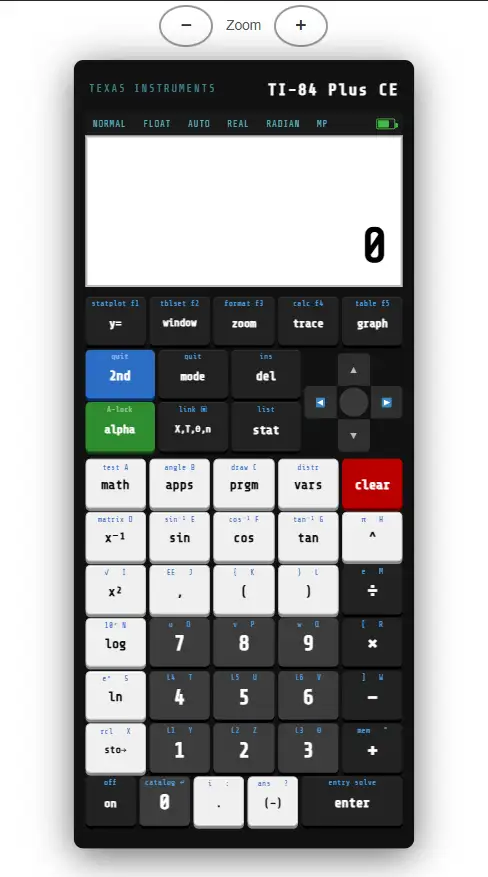
An online TI-85 emulator runs the same core functions as the physical device. It mirrors the button layout, the menu system, and the calculation logic. You interact with it using your mouse or keyboard.
Here is what you can do with the online TI-85 graphing calculator:
The TI-85 graphing capability is the main draw. You enter a function. The calculator plots it instantly. You can zoom in, trace along the curve, and find key points like maxima, minima, and intercepts.
Pro Tip: Bookmark the online TI-85 on your phone, too. TI-85 Calculator Online: Use Phones support browser-based emulators just as well as desktops. Having it saved saves you in a pinch.
TI-85 vs TI-84 vs TI-86: Which One Do You Need?
Students often ask which calculator they should use. Here is a quick comparison to clear that up.
| Model | Released | Best For | Still Common? |
| TI-85 | 1992 | Algebra, calculus basics | Online use only |
| TI-86 | 1997 | Engineering, more memory | Occasionally |
| TI-84 Plus CE | 2015 | SAT, ACT, high school | Yes, very common |
If your teacher specifies the TI-85, the online version is your best bet. If you have a choice, the TI-84 Plus CE is the current standard for most US classrooms. Many online resources, like ti84calcwiz, focus on the TI-84 family. But for the TI-85 specifically, the emulator approach works well.
How to Use the TI-85 Calculator Online: Step-by-Step
Step 1: Open the Emulator
Search for "TI-85 calculator online" or go directly to a trusted emulator site. No account creation needed. The interface loads right in your browser.
Step 2: Get Familiar with the Layout
The Texas Instruments TI-85 has a layout that might look different from modern calculators. The top row of keys are function keys, labeled F1 through F5. These change depending on which menu you are in. The screen above the keys always shows what each function key does.
Step 3: Enter a Calculation
Click the number and operator keys just like you would press them on a physical device. For basic arithmetic, type your expression and press ENTER. The result shows on screen immediately.
Step 4: Graph a Function
Press the GRAPH key (or navigate to the graphing menu). Ti-85 Calculator Online Enter your equation using the Y= editor. Press GRAPH again to see the plot. Use the zoom buttons to adjust the view.
Step 5: Use the TRACE Feature
Once a graph appears, press TRACE. Move the cursor along the curve using the left and right arrow keys. The x and y values update in real time at the bottom of the screen.
Step 6: Access Advanced Functions
The CALC menu gives you tools to find roots, intersections, minima, and maxima. The MATH menu holds operations for trigonometry, logarithms, and number theory. Explore these menus the same way you would on the physical calculator.
Key Functions of the TI-85 Graphing Calculator
The Texas Instruments TI-85 graphing calculator was designed for serious math work. Here are the core areas it handles well.
Algebraic and Arithmetic Functions
Basic operations like addition, subtraction, multiplication, and division are straightforward. But the TI-83 also handles powers, roots, factorials, and scientific notation. You can store values in memory variables and recall them mid-calculation.
Graphing and Visual Analysis
The TI-85 graphing feature lets you plot functions in Cartesian, polar, and parametric modes. You can graph up to 99 functions at once. The window settings give you full control over the x and y axis range.
Matrix Operations
Students in linear algebra courses will find the matrix editor useful. You can define matrices, multiply them, find determinants, and compute inverses. Ti-85 Calculator Online. This is one area where the Texas Instruments TI-85 outperformed many of its contemporaries.
Statistics and Regression
Enter a data set, run basic statistics, and fit a regression line. The calculator supports linear, quadratic, and exponential regression models. It also handles scatter plots.
Calculus Tools
The TI-85 can find numerical derivatives and definite integrals. These are not symbolic computations. They use numerical methods, which means results are very close approximations. For most coursework, this is exactly what you need.
Is the TI-85 Plus Real?
You might see searches for "TI-85 plus" or "TI-85 plus calculator" online. To be clear: Texas Instruments never released an official TI-85 Plus model. The "Plus" naming convention came with the TI-83 Plus and TI-84 Plus lines, which came later.
The Texas Instruments TI-85 plus references you see are usually referring to the standard TI-85 with extra features available in the emulator. Some online tools add functionality beyond what the original hardware had. That can be helpful, but know that it goes beyond the original device specs.
Note for test-takers: Online calculators are not allowed during standardized tests like the SAT or AP exams. For those, you need an approved physical device. Check your test guidelines before exam day.
Why Students Still Use the TI-85 in 2026
Older does not mean useless. Many teachers who trained on the TI-85 still build lessons around it. Some textbooks from the 1990s and early 2000s include step-by-step TI-85 instructions. Students following those guides need to know the same interface.
The online TI-85 also serves students who cannot afford a physical graphing calculator. A quality graphing calculator costs anywhere from $80 to $150. The online version costs nothing. Ti-85 Calculator Online: For budget-conscious students, that matters a lot.
And for teachers, having students use the same calculator interface creates consistency in the classroom. When everyone is using the same tool, instructions are cleaner and faster.
TI-85 Manual Guide: Quick Reference
Texas Instruments published an official TI-85 manual. You can find it as a PDF through the Texas Instruments education portal. It covers every function, menu, and mode in detail.
Here are a few shortcut tips from the manual that come in handy:
These habits carry over whether you are using the physical device or the online emulator.
Sites That Offer the TI-85 Online
A few platforms host Texas Instruments calculator emulators for free. Here are the most commonly referenced ones:
- Wabbitemu: A well-known TI emulator that runs in the browser and supports the TI-85 ROM
- TI-84 Calc Wiz (ti84calcwiz): Focuses mainly on the TI-84 family but has resources for related models
- CalcPlex and similar tools: Offer simplified graphing interfaces based on TI calculator logic
- Desmos: Not a TI emulator, but a powerful graphing calculator that handles most of what students need
One important note: To run a full TI-85 emulator properly, you often need the original ROM file. Texas Instruments owns the rights to these files. Downloading ROMs without owning the physical calculator may violate their terms of service. Always check the legal status before downloading any ROM file.
FAQs | Ti-85 Calculator Online Free
Bottom Line
The TI-85 calculator holds up. Decades after its release, students still need it. And now, you do not need to track down a physical unit or pay for one. The online TI-85 graphing calculator gives you the full toolset in your browser. Graph functions. Run statistics. Work matrices. Solve equations. All without a download.
If you are a student, bookmark the online TI-85 right now. It will save you more than once. And if your teacher or textbook references the Texas Instruments TI-85, you are already set. Math class does not have to wait for the right equipment. The tool is already in your hands.
Written for students, by educators.
This article was reviewed for accuracy against Texas Instruments' official documentation and current emulator capabilities. Content is updated regularly to reflect the latest tools available to students.
References & Further Reading: