Desmos Graphing Calculator: Everything You Need to Know
The Desmos graphing calculator is a free, browser-based tool that turns equations into instant visuals. Students, teachers, and professionals across the world use it every single day. Whether you are in a classroom in Virginia or taking the SAT in Texas, Desmos is likely already part of your toolkit.
This guide covers everything: what it is, how it works, where to use it, and why it has become the go-to graphing tool for millions of people.
Desmos | Beautiful free math.
What Is the Desmos Graphing Calculator?
Desmos is a free online graphing calculator available at www.desmos.com. It was built by Eli Luberoff and launched in 2011. The goal was simple: make math beautiful and accessible to everyone.
Today, Desmos is used in more than 150 countries. It has tools for graphing, algebra, geometry, and data analysis. The platform covers everything from basic arithmetic to advanced calculus, all without requiring a download.
The main product, the Desmos graphing calculator, lets you type in any equation and watch it appear on a coordinate plane in real time. There is no setup. No account required. Just go to desmos.com and start graphing.
The Desmos Calculator Lineup
Desmos is not just one tool. It offers a full suite of calculators for different math needs.
Desmos Graphing Calculator
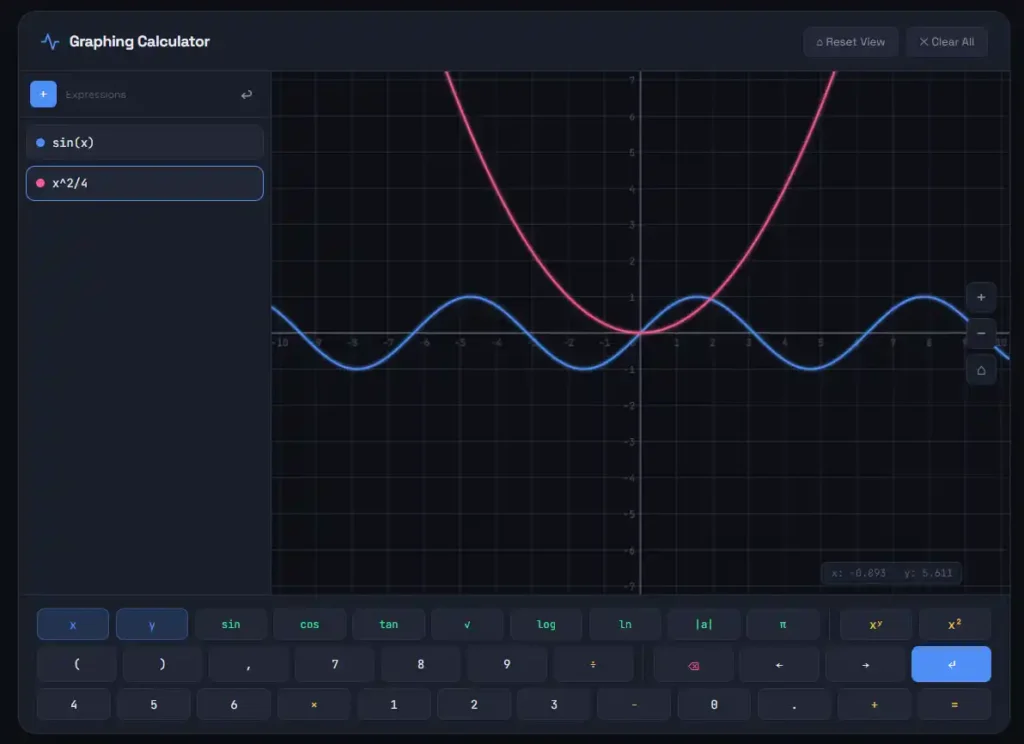
This is the flagship tool. It lives at www.desmos.com/calculator. You type an equation on the left panel. The graph appears on the right. It supports functions, inequalities, parametric equations, and much more.
You can add sliders to animate variables. You can trace along a curve to find exact values. You can zoom in and out with a pinch or scroll. The experience is smooth, fast, and visual.
Desmos Scientific Calculator
The Desmos scientific calculator is a clean, no-frills calculator for arithmetic and algebra. It handles trigonometry, logarithms, exponents, roots, and more. You can access it at www.desmos.com/scientific.
Many states approve the Desmos scientific calculator for standardized testing. If you are in Virginia, for example, the Desmos Virginia graphing calculator and Desmos scientific calculator Virginia version are both approved for SOL testing.
Desmos 4 Function Calculator
The Desmos 4 function calculator handles addition, subtraction, multiplication, and division. It is the simplest tool in the lineup. It is designed for younger students or situations where a basic calculator is all that is needed.
Desmos Matrix Calculator
The matrix calculator lets you work with matrices directly. You can add, multiply, and find determinants. It is especially useful for linear algebra students.
Desmos 3D Graphing Calculator
The Desmos 3D graphing calculator is one of the newer additions. It lets you graph equations in three dimensions. You can rotate and explore surfaces, which makes it incredibly useful for visualizing multivariable calculus concepts.
Go to www.desmos.com/3d to access the 3D graph tool. Teachers use it to show students what functions like z = sin(x) + cos(y) actually look like in space.
How to Use the Desmos Graphing Calculator
You do not need a tutorial to get started. But knowing a few key features helps you work faster.
Typing Equations
Click in the expression panel on the left side of the screen. Type your equation using standard math notation. For example, typing y = 2x + 3 will draw a straight line. Typing y = x^2 will draw a parabola.
Desmos understands a wide range of input formats. It will even correct basic syntax errors and suggest what you might mean.
Using Sliders
Sliders are one of the most powerful features. When you use a variable that is not defined, Desmos asks if you want to add a slider for it. Click yes. Now you can drag that slider and watch the graph change in real time.
This is great for exploring how changing the slope affects a line or how changing the period affects a sine wave.
Piecewise Functions
Knowing how to graph piecewise functions on Desmos is useful for precalculus and calculus students. You define each piece separately using curly brackets. For example:
f(x) = {x < 0: -x, x >= 0: x}
This creates an absolute value graph. Desmos handles piecewise logic cleanly.
Polar Graphs
Switch to polar mode from the wrench icon at the top right. The Desmos polar graph tool supports equations in the form r = f(θ). You can graph roses, cardioids, limaçons, and spirals with ease.
Regression and Line of Best Fit
Desmos handles data too. Enter a table of values and then use the regression feature. The line of best fit calculator in Desmos fits linear, quadratic, exponential, and other models to your data. It even shows the R-squared value.
Desmos Derivative Calculator
You can compute derivatives using the prime notation or the d/dx syntax. For example, typing y = d/dx(x^3) will graph the derivative of x cubed. This makes it a functional Desmos derivative calculator for calculus students.
Desmos and Standardized Testing
One of the biggest reasons students search for Desmos today is testing.
SAT and College Board
The College Board approved Desmos for use on the digital SAT. Students taking the SAT on Bluebook now have the Desmos graphing calculator built right into the testing app. There is no need to bring a physical calculator.
This has been huge. The Desmos SAT calculator is the same tool students use every day in class. No learning curve on test day.
State Testing
Many states have approved Desmos for their own standardized exams:
Each state has its own rules about which Desmos tools are allowed and when. Always check with your teacher or testing coordinator for the most current guidance.
Desmos Testing Calculator
The Desmos testing calculator is a version of the tool that is embedded into approved testing platforms. It looks just like the standard version but may have some features restricted depending on the exam.
Students can practice with the standard version at desmos.com and feel confident using it during official tests.
Desmos in the Classroom
Desmos built a separate platform specifically for teachers and students. It is called Desmos Classroom.
Student Desmos
Student Desmos is a learning environment at student.desmos.com. Teachers create interactive activities and assign them to students. Students join using a class code and work through the activity on any device.
The Desmos classroom student experience is guided. Students respond to prompts, manipulate graphs, and explore math concepts step by step. Teachers can see all student responses in real time on their dashboard.
Desmos Activity Builder
Teachers build custom lessons using Desmos Activity Builder. The interface is drag-and-drop. You can add graph screens, multiple choice questions, free response boxes, and more.
This has made Desmos a powerful tool for formative assessment. Teachers see exactly where students are stuck without waiting for quiz results.
Desmos App and Download Options
Desmos App
The Desmos calculator app is available for both iOS and Android. The Desmos graphing calculator app offers the same core functionality as the web version. It works offline too, which makes it useful for studying anywhere.
To get it, search for “Desmos graphing calculator” in the App Store or Google Play. The Desmos app download is free.
Desmos Download for Windows
There is no official standalone Desmos download for Windows 10 or desktop. The best way to use Desmos on a PC is through your browser. Chrome, Firefox, Edge, and Safari all work well.
If you want something close to a desktop experience, you can install the Progressive Web App (PWA) version through Chrome. This lets you use Desmos offline without needing a browser tab open.
Searching for “Desmos graphing calculator download for Windows 10” leads many users to third-party sites. Be careful. Stick to the official site at desmos.com to stay safe.
Desmos vs. the TI-84
For years, the TI-84 was the gold standard. Every high school student bought one. They cost around $100 and teachers required them.
That picture is changing.
Desmos offers most of what the TI-84 does, for free. The Desmos TI-84 calculator comparison often favors Desmos for everyday learning. The interface is cleaner. Sharing graphs is easier. There are no batteries to replace.
Some users even search for “Desmos TI 84” hoping to emulate the TI experience inside Desmos. While Desmos is not a direct replacement for every TI function, it handles the vast majority of high school and early college math.
For standardized testing, many exams now prefer or require Desmos. The TI-84 is still allowed on the ACT, but the SAT has moved to Desmos. This shift is accelerating.
Cool Things You Can Build with Desmos
Desmos is also a creative tool. Artists and math enthusiasts use it to build incredible visuals.
Hello Kitty and Mickey Mouse
Yes, really. Artists have used Desmos equations to draw Hello Kitty, Mickey Mouse, and countless other characters. These projects use dozens or hundreds of equations, each carefully crafted to form a specific line or curve. Searching for “Hello Kitty Desmos” or “Mickey Mouse Desmos” will show you what is possible.
Julia Set on Desmos
The Julia set is a type of fractal from complex number theory. Some users have approximated the Julia set in Desmos using parametric equations and color shading. It is a beautiful example of math art.
Stained Glass Desmos
Teachers often assign stained glass window projects where students use Desmos to create colorful geometric patterns. Each colored region is defined by an inequality. The result looks like real stained glass. It teaches inequalities in a way that sticks.
Bar Graphs and Histograms
Desmos is not just for curves. You can create a Desmos bar graph using lists and the bar chart feature. The Desmos histogram creator allows students to input data and visualize distributions quickly.
Venn Diagram Calculator
The Desmos Venn diagram calculator with three circles helps visualize set relationships. While it is not a built-in feature, users have created shared graphs that model three-circle Venn diagrams using circle equations and shading.
Desmos for Advanced Math
Desmos scales up to meet advanced math needs, too.
Desmos Algebra
The algebra calculator in Desmos handles expressions, equations, and systems. You can solve systems of equations graphically by finding intersection points. The Desmos algebra tiles calculator is a separate tool in the Desmos suite designed for visualizing polynomial operations.
Desmos Trigonometry Calculator
You can graph sin, cos, tan, and all their inverses. The Desmos trig calculator supports degree and radian modes. Students use it to visualize phase shifts, amplitude changes, and period transformations.
Desmos Linear Algebra
For matrix operations, the Desmos matrix calculator and the linear algebra features handle vectors, transformations, and systems. It is more limited than dedicated software like MATLAB, but useful for introductory linear algebra.
Desmos Equation Solver
Desmos can solve equations graphically. Type two equations and find where they intersect. You can also use the solver feature within the expression panel to find exact zeros and intersections.
The Desmos API
Developers can embed Desmos in their own websites and applications using the Desmos API. The API is well-documented and free to use for non-commercial purposes.
With the Desmos API, you can pre-load equations, restrict user interactions, and build interactive math lessons inside your own app. Many edtech companies use it to power graphing features in their products.
Why Desmos Became the Industry Standard
There are a few clear reasons Desmos won.
It is free. No purchase. No subscription. No student account required.
It runs everywhere. Any browser, any device. Phone, tablet, laptop, school Chromebook. It does not matter.
It is fast. Graphs appear the instant you type. There is no lag, no loading screen.
It is accurate. The math engine behind Desmos is precise. It handles edge cases that trip up lesser calculators.
It was built for learning. Every design decision was made with students and teachers in mind. The interface does not overwhelm. It invites exploration.
Desmos has stayed free because of its mission: “Math for every student.” The company earns revenue through institutional partnerships and licensing, but the core tools remain publicly accessible.
Desmos and the Future of Math Education
Math education is shifting. Paper-and-pencil calculation is becoming less central. Understanding and reasoning are becoming more important. Tools like Desmos support that shift.
When students can instantly see the graph of any equation, they spend less time on mechanics and more time on meaning. They ask better questions. They notice patterns. They build intuition.
The addition of Desmos 3D graphing is a good example of this direction. Three-dimensional graphs were once reserved for expensive software or advanced courses. Now any student can explore them for free. Desmos is also investing in its classroom platform. The activity library grows every year. Teachers share their work freely. The Desmos math community is active and collaborative.
Desmos: Beautiful Free Math | Calculator ACT Version
That is not just a tagline. It is the entire philosophy behind the platform.
When you land on www.desmos.com, the first thing you notice is how clean everything looks. There are no ads. No pop-ups asking you to upgrade. No paywalls hiding the good stuff. Just a blank coordinate plane and an expression panel waiting for your input.
Desmos describes itself as “beautiful, free math.” Both words matter equally.
The “free” part is obvious. Any student with a phone or a school laptop can access every Desmos tool without paying a cent. No app purchase. No premium tier. The full graphing calculator, scientific calculator, geometry tool, and 3D grapher are all available at no cost.
The “beautiful” part is just as real. The graphs are crisp and smooth. The color coding is thoughtful. Labels are readable. Animations are fluid. Desmos did not just build a functional calculator. It built one that people actually enjoy using. That combination is rare in educational software. Most math tools feel like chores.
Desmos feels like exploration. That difference is why it spread so fast in classrooms and why students keep using it outside of school too. The tagline also reflects the company’s deeper mission. Desmos was built on the belief that access to quality math tools should not depend on where you live or how much money your school has. One browser, any device, no cost. That is beautiful free math in action.
Desmos Graphing Calculator on Google Play
Android users can get the full Desmos experience through the Google Play Store. The Desmos graphing calculator app on Google Play is free to download and carries a strong rating from millions of users worldwide.
Searching “Desmos graphing calculator” in the Play Store brings up the official app published by Desmos Inc. It is the one with the simple red and white graph icon. Download that one. Avoid any imitation apps.
Here is what you get with the Android app:
The full graphing calculator works offline. You can save graphs to your account and access them across devices. The interface adjusts cleanly to both phone and tablet screens. Pinch to zoom, tap to trace, and swipe to pan all work exactly as you would expect.
The app syncs with your Desmos account if you have one. This means a graph you start on your phone is ready on your laptop when you sit down to study. No emailing yourself links or screenshots.
One thing to know: the Desmos app on Android does not include every calculator in the suite. The scientific calculator and 4 function calculator are separate apps in the Play Store, also free. If you want the graphing calculator specifically, make sure you download the correct one.
Updates roll out regularly. The development team responds to user feedback and keeps the app in line with the browser version. Features added to the web version typically appear in the app within a reasonable timeframe. For students who do most of their studying on an Android phone, this app removes every excuse not to practice graphing. It is fast, reliable, and fully capable.
Desmos Graphing Calculator on the App Store
iPhone and iPad users have the same access through Apple’s App Store. The Desmos graphing calculator app for iOS is free and available to anyone with an Apple ID.
The iOS version is polished and well-maintained. It takes full advantage of larger iPad screens, which makes it especially useful for students who do math on a tablet. The expression panel and graph panel sit side by side in landscape mode, just like the desktop version.
A few things worth knowing about the iOS app:
It works offline. Once downloaded, you do not need a Wi-Fi connection to graph equations. This is useful during long commutes, in areas with poor signal, or in schools where internet access is unreliable.
It supports Apple Pencil on compatible iPads. This makes entering handwritten equations feel natural. Students who prefer writing over typing will appreciate this.
The app also integrates with iCloud for students who use Apple’s ecosystem for school. Saved graphs and account data are accessible across all Apple devices logged into the same account.
Like the Android version, the iOS app focuses on the graphing calculator. The Desmos scientific calculator app is a separate download in the App Store, also free. If your teacher or testing coordinator asks you to have the scientific calculator app, search for it specifically.
The App Store listing shows a consistently high rating. Reviews highlight speed, accuracy, and how closely the app matches the browser version. Students who practice on the app feel comfortable using the browser version during tests.
Both the Google Play and App Store versions carry one important endorsement: they are built and maintained by Desmos Inc. itself. You are getting the real thing, not a third-party imitation.
Graphing Calculator vs. Scientific Calculator
Many students wonder which one they actually need. The answer depends on what kind of math you are doing.
A scientific calculator handles computation. You enter a number, apply a function, and get a result. It handles sine, cosine, tangent, logarithms, exponents, square roots, and factorials. It works with one expression at a time. You get a number back.
A graphing calculator does all of that and adds visualization. Instead of just computing y when x equals 3, it draws the entire curve of y across every value of x. You see the shape of the function. You spot patterns. You understand behavior, not just values.
Here is a simple way to think about it:
Scientific calculators answer “what is the value?” Graphing calculators answer “what does this look like?”
For basic math, chemistry, and physics classes, a scientific calculator is usually enough. For algebra 2, precalculus, calculus, and statistics, a graphing calculator becomes much more valuable.
The other key difference is data handling. A graphing calculator lets you enter a table of values, run a regression, and see the resulting curve. A scientific calculator does not do that.
Price is a factor with physical calculators. A scientific calculator typically costs between $10 and $20. A graphing calculator, especially the TI-84, can cost $100 or more. Desmos removes this barrier entirely by offering both for free online.
For standardized tests, the permitted calculator type varies by exam. The SAT now uses Desmos directly on the digital test. The ACT still allows both scientific and graphing calculators. Always verify what is permitted for your specific exam before test day.
If you are buying a physical calculator, match it to your current course level. If you are using Desmos online, you have access to both tools at no cost, so the decision becomes about which one you open.
Desmos Graphing Calculator vs. Desmos Scientific Calculator
Within the Desmos platform itself, students often ask: which calculator should I use?
Both tools are excellent. They serve different purposes. Knowing the difference helps you pick the right one from the start.
The Desmos graphing calculator at desmos.com/calculator is built around visualization. Its entire design centers on the coordinate plane. You write expressions in the left panel. Graphs appear on the right. It supports multiple equations at once. You can shade regions, plot points, add sliders, and animate variables. It is a dynamic, visual tool.
It is ideal for: algebra, precalculus, calculus, statistics, and any course where you need to see the shape or behavior of a function.
The Desmos scientific calculator at desmos.com/scientific is built around computation. It looks more like a traditional calculator. You press buttons or type in expressions. It returns a single result. It handles trigonometry, logarithms, exponents, factorial, and standard arithmetic. There is no coordinate plane.
It is ideal for: chemistry, physics, basic algebra, and any situation where you need to quickly compute a value without graphing anything.
Here is where it gets practical for testing:
The Desmos scientific calculator is the version approved for exams that allow a scientific calculator only. In Virginia SOL testing, for example, some sections permit only the scientific calculator. The graphing calculator version is available for sections that allow it. Knowing which one to use, and when, is part of test preparation.
For everyday studying, you can switch between them freely. Many students keep both tabs open. Use the scientific calculator for quick number crunching. Switch to the graphing calculator when you need to see a function visually.
The core math engine powering both tools comes from the same place. Results are consistent between them. If you compute sin(30°) on the scientific calculator, you get the same value as evaluating sin(30°) inside the graphing calculator’s expression panel.
Think of them as two modes of the same brain. One shows you numbers. The other shows you pictures. Great math understanding needs both.
Final Thoughts
The Desmos graphing calculator is not just a tool. It is a shift in how people relate to math.
It removes the friction between an idea and its visual form. You think of an equation. You see its graph. That immediacy changes how you learn.
Whether you are a student preparing for the SAT, a teacher building an interactive lesson, a parent helping with homework, or an engineer exploring a model, Desmos meets you where you are. It is free. It is powerful.
It is everywhere. And it just keeps getting better.
Quick Reference: Desmos Links
Here is a handy list of the main Desmos tools and where to find them:
- Graphing Calculator: desmos.com/calculator
- Scientific Calculator: desmos.com/scientific
- 4 Function Calculator: desmos.com/fourfunction
- Matrix Calculator: desmos.com/matrix
- 3D Graphing Calculator: desmos.com/3d
- Geometry Tool: desmos.com/geometry
- Student Classroom: student.desmos.com
- Teacher Dashboard: teacher.desmos.com
All tools are free and require no login to use.
FAQs | Desmos Graphing Calculator
Sources and references:
Desmos Official Site | College Board Digital SAT | Desmos Teacher Activity Builder | Desmos API Documentation