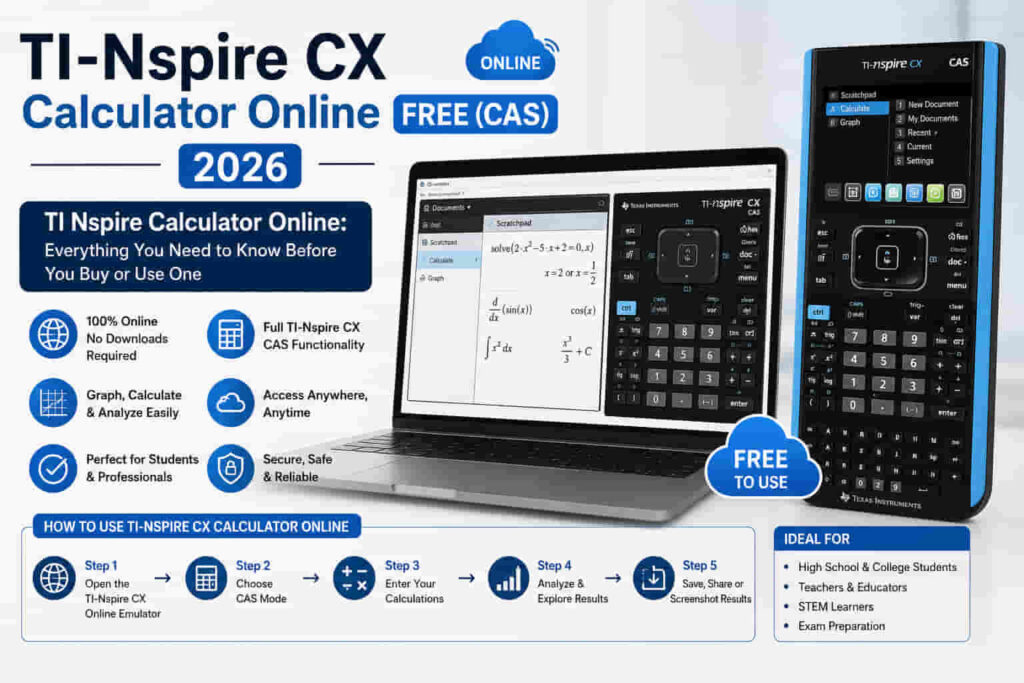
TI Nspire Calculator Online: Everything You Need to Know Before You Buy or Use One
If you have ever stared at a math problem that needed more than your phone could handle, you already know the pain. You needed a real graphing calculator. And if you searched long enough, you found the TI Nspire.
This guide covers everything: what the TI Nspire series actually is, which model fits your needs, how to use a TI Nspire calculator online, and whether the CAS version is worth it. No fluff. Just clear answers.
What Is the TI Nspire Calculator?
The TI Nspire is a graphing calculator made by Texas Instruments. It was first released in 2007. Since then, it has become one of the most widely used calculators in high school and college math classes worldwide.
The name itself breaks into two ideas: TI stands for Texas Instruments, and Nspire refers to the product line. Students often search for it as the tinspire, ti nspire, or even n spire, but they all point to the same family of devices. What makes it different from a standard scientific calculator is the operating system. The TI Nspire runs a full document-based system.
You can save problems, organize work into folders, and move between subjects the way you would on a computer. It also supports color screens, 3D graphing, Python programming, and in some models, a built-in Computer Algebra System (CAS).
Texas Instruments has sold it in schools, at Walmart, Target, Staples, and Amazon. It is available as a handheld device and as downloadable software.
TI Nspire CX II CAS: Key Features Worth Knowing
3D Graphing
The TI Nspire CX II and CX II CAS both support 3D graphing. You can plot surfaces, rotate them, and explore three-dimensional math concepts that a 2D graph cannot show. This is particularly useful in multivariable calculus and linear algebra.
Python Programming
Since the CX II update, the TI Nspire supports Python. Students can write and run basic Python scripts directly on the calculator. This is useful for computer science courses that allow calculator use, and for anyone learning programming fundamentals.
The Python support is not full Python. It is a subset designed for the calculator environment. But it covers loops, functions, and basic data structures.
Vernier DataQuest
The TI Nspire connects to Vernier sensors through a Lab Cradle or directly with compatible sensors. The Vernier DataQuest app is built into the calculator. This means you can collect real-world data in science labs and analyze it immediately.
TI-84 Plus Keypad Compatibility
Older versions of the TI Nspire (the original touchpad models) could swap keypads and run in a TI-84 mode. This was helpful for students switching between the two ecosystems. The newer CX II series does not support this feature, but it is worth knowing if you encounter a used TI Nspire with a ti 84 plus keypad.
Navigator System
The TI Nspire Navigator is a classroom network system. Teachers use it to send files to student calculators, collect work, and monitor progress in real time. If your school uses it, your calculator connects wirelessly to the teacher’s hub.
The TI Nspire Series: All Models Explained
The TI Nspire series has gone through several generations. Each one added features and improved on the last. Here is a breakdown of the main models you will encounter.
TI Nspire CX
The TI Nspire CX was the first model to bring a full-color backlit screen to the line. Before this, the screens were grayscale. The color display changed how students interacted with graphs and data. This model supports image overlays, meaning you can import a photo and graph equations over it.
It is a popular choice for algebra, precalculus, and statistics courses. The TI Nspire CX is not a CAS calculator. It handles numerical computations but does not simplify symbolic expressions automatically.
TI Nspire CX CAS
The TI Nspire CX CAS adds a Computer Algebra System on top of everything the standard CX offers. CAS means the calculator can work with variables symbolically. It can factor expressions, solve equations in exact form, differentiate, and integrate.
For example, if you type the integral of x squared, a standard graphing calculator gives you a decimal approximation. The CX CAS gives you the exact answer with the constant of integration.
This is why many college professors and standardized test bodies have opinions about it. Some exams allow it; others do not. Always check your test rules before relying on the CAS version.
TI Nspire CX II
The TI Nspire CX II is the direct successor to the original CX. Released in 2019, it brought a faster processor, Python programming support, and improved performance across the board.
The CX II comes in two versions: the standard (non-CAS) and the CX II CAS. Both share the same hardware improvements. The difference is only in the software capability.
TI Nspire CX II CAS
The TI Nspire CX II CAS is the most powerful handheld calculator Texas Instruments currently sells for students. It combines the updated CX II hardware with full CAS functionality.
It runs faster, supports Python scripts, handles 3D graphing natively, and connects to lab equipment through the TI Lab Cradle. You will see this referred to as the ti nspire cx ii cas, the cxii cas, or sometimes the ti nspire cx2 cas. They all mean the same device.
TI Nspire CX II T and CX II T CAS
The “T” at the end stands for Teacher or European edition, depending on the retailer. These versions are sold in certain markets and come with slight packaging or software differences. The core calculator functions are the same.
In German-speaking countries, you might see the ti nspire cx ii t cas listed on platforms like Willhaben. In the UK and Europe, it is commonly found through education suppliers.
Non-CAS vs CAS: Which One Do You Need?
This is the most common question. Here is the short answer.
If you are in high school and your exam board allows graphing calculators but restricts CAS, get the TI Nspire CX II. It covers everything from algebra to statistics to basic calculus. If you are in college and your professor allows CAS tools, get the TI Nspire CX II CAS.
The symbolic computation power saves significant time on exams and homework. If you are unsure, check your course syllabus. Most professors list approved calculators explicitly.
TI-Nspire CX II Graphing Calculator: What TI Education Actually Offers
Texas Instruments markets the TI Nspire CX II as their flagship student graphing calculator. The TI Education website presents it as a tool built for STEM learning from middle school through university. What stands out from the official product page is how TI positions the CX II. They emphasize three things: rechargeable battery life, Python programming support, and the color high-resolution screen at 125 DPI.
The rechargeable battery is genuinely useful. You get roughly two weeks of normal classroom use on a single charge. Compare that to the TI-84, which still runs on AAA batteries. The CX II eliminates that problem entirely. The screen is 320 by 240 pixels. It is not a phone screen, but it renders graphs and color-coded equations clearly. For a dedicated math tool, it does exactly what it needs to do.
TI Education also highlights the document-based workflow as a core feature. You organize your work into notebooks and folders. This is especially helpful for students who want to review old work before exams.
One thing the TI Education listing does not stress enough: the CX II is one of the few graphing calculators that lets you program in Python. This matters as high school curricula increasingly incorporate coding. The calculator becomes a two-in-one tool for math and computer science.
TI Nspire Calculator Free 100%: How to Actually Get It Without Paying
You want to use a TI Nspire calculator free of charge. That is a fair goal, especially since the physical device costs over $100. Here is exactly what is available and what is not.
The Official Free Trial from Texas Instruments
Texas Instruments offers a free 90-day trial of the TI Nspire CX Premium Teacher Software. This is the full desktop application. It runs on Windows and Mac. It includes the CAS version. You get every feature the paid software has, for three months, at no cost.
To access it, go to the TI Education website and look for the software download section. You create a TI account, download the installer, and activate the trial. No credit card is required during the trial period.
This is the most legitimate and complete way to use a TI Nspire calculator free. The interface is identical to the handheld device.
TI Nspire Student Software Trial
Beyond the teacher version, TI also offers a student software trial. The duration is shorter, typically 30 days. But it gives you full access to the graphing, CAS, and statistics tools on your laptop or desktop.
Students who are deciding whether to buy the physical device often use this trial period to learn the interface first. That is a smart approach. The software and hardware feel very similar.
Free Browser-Based Access
Some schools and districts purchase site licenses. If your school has one, your teacher can provide login credentials that give you browser-based access to the TI Nspire tools. This costs you nothing as a student.
If you are not sure whether your school has a license, ask your math teacher directly. Many teachers do not actively advertise this because they assume students will just buy their own device.
What Is Not Actually Free
Third-party websites that claim to offer a permanent free TI Nspire CAS calculator online with no limits should be approached with caution. Many of these are either outdated emulators with calculation errors, sites that serve heavy advertising, or tools that only replicate basic graphing without CAS capability.
For reliable free access, the official TI trial software and the online browser tool from Texas Instruments are your safest options.
TI-Nspire CX CAS Graphing Calculator: The Texas Instruments Official Version
The TI Nspire CX CAS graphing calculator is Texas Instruments’ answer to students who need more than numerical computation. It is a dedicated CAS device, which means it handles algebra symbolically rather than just numerically.
Here is what that means in practice.
When you ask a standard graphing calculator to solve the equation 2x plus 5 equals 11, it gives you a decimal or a graph. The CX CAS solves it exactly and shows x equals 3. When you differentiate a polynomial, it returns the exact derivative. When you factor a quadratic, it shows the factored form.
For calculus students, this is transformative. Instead of working out integrals by hand and checking with approximations, you can verify exact answers directly on the calculator.
Texas Instruments positions the CX CAS toward students in AP Calculus, college math, engineering programs, and IB courses. The IB (International Baccalaureate) Math HL and Analysis and Approaches courses at the Higher Level explicitly permit CAS calculators. The TI Nspire CX CAS is one of the most common choices among IB students globally.
What the CX CAS Does That Other Calculators Cannot
Symbolic algebra is the headline feature. But the CX CAS also handles these tasks in ways standard calculators cannot:
What the CX CAS Cannot Do
No calculator replaces mathematical understanding. The CAS will not tell you which method to use or explain why a result makes sense. It also does not help you set up problems correctly. If you input the wrong equation, the correct answer to the wrong problem helps nobody.
Some students become dependent on CAS and struggle when they sit exams that restrict it. Build your manual skills alongside your calculator skills.
Texas Instruments TI-Nspire CX II CAS Graphing Calculator: Full Product Review
The Texas Instruments TI Nspire CX II CAS is the current top model in the TI Nspire line. If you are evaluating it as a purchase, this section covers the real details beyond what a product listing tells you.
Build and Design
The CX II CAS is a slim handheld device. It feels noticeably lighter than the older CX models. The keys have a clean tactile feel with good spacing. Color coding on the keypad makes it easier to find functions quickly.
The screen is bright and easy to read in most lighting. In direct sunlight it can wash out, but classrooms and exam halls rarely present that problem.
The device comes with a slide-on protective cover. This matters because a cracked screen on a $150 calculator is painful. The cover snaps on firmly and does not fall off during normal bag use.
Performance
The processor upgrade in the CX II generation made a real difference. Graphing complex functions, running Python scripts, and switching between applications all feel faster than on older models. There are no significant lag moments during normal math work.
3D graphing renders smoothly enough to be usable. Rotating a 3D surface to view it from different angles works without frustrating delays.
Battery Life
The lithium-ion rechargeable battery is one of the best practical improvements over older TI models. Texas Instruments rates it at up to two weeks of typical classroom use per charge. In real student use, this means charging once every week or two depending on how heavily you use it.
The charging cable is a standard mini-USB. This is the same connector that older Android phones used. If you lose the cable that comes in the box, a replacement costs a few dollars.
Software and Updates
Texas Instruments pushes firmware updates for the CX II CAS periodically. These updates fix bugs, improve Python compatibility, and occasionally add new features. You apply updates by connecting the calculator to a computer with the TI Nspire software installed.
Keeping the firmware updated is worth doing before major exams. Occasionally updates affect calculator behavior in subtle ways, so do not update the night before a test.
Who Should Buy the CX II CAS
This is the right calculator for students in IB Math, AP Calculus BC, college-level mathematics, physics, and engineering. It is also worth considering if you plan to use the same device through four or more years of coursework.
It is probably more than you need for standard high school algebra or geometry. In those cases, the non-CAS CX II handles everything required.
TEXAS INSTRUMENTS TI-Nspire CX II CAS Graphing Calculator: What You See at Retail
Walk into a Walmart or Target that stocks calculators and you will likely see the TI Nspire CX II CAS in the display case near the school supplies section. The retail packaging is worth understanding because it affects what you get in the box.
What Comes in the Box
Texas Instruments includes these items with the standard retail unit:
The calculator itself with the slide-on cover attached. A mini-USB charging cable. A TI connectivity cable for connecting to sensors and lab equipment. A quick start guide in print. A software license card for the TI Nspire Student Software, which gives you 30-day trial access on your computer.
Some retail bundles at Amazon or Target include a carrying case. These bundles are worth paying a few extra dollars for if you plan to carry the calculator in a backpack regularly.
Retail Pricing Reality
MSRP for the CX II CAS sits around $165. You rarely pay that much. Amazon typically lists it for $130 to $150. Walmart and Target match or come close. During back-to-school season (July through September), prices sometimes dip slightly, though not dramatically.
If price is a concern, the certified refurbished units that Texas Instruments sells directly are worth checking. These come with a warranty and are tested to manufacturer standards. They typically run $20 to $30 less than new.
International Availability
In Pakistan, India, and other South Asian markets, the TI Nspire CX II CAS is available through electronics importers and platforms like OLX. Pricing in these markets is higher due to import costs. Expect to pay the equivalent of $180 to $220 depending on the seller and condition.
If you are buying internationally, confirm that the unit is an authentic Texas Instruments product. Counterfeit calculators exist in some markets and they do not perform the same way.
TI-Nspire CX II Online Calculator vs TI Nspire CX Calculator: Which One Should You Use?
This is a question many students have when they discover that both a newer and older version exist. The answer depends on your situation.
The Key Hardware Differences
The TI Nspire CX came out in 2011. The TI Nspire CX II launched in 2019. Eight years of development sit between them.
The CX II runs on a faster processor. It adds Python programming support. The display is the same resolution, but the software rendering is improved. Battery performance is similar between the two.
If you are comparing online emulators or software versions of these two calculators, the CX II software version includes Python support. The older CX software version does not.
Which Online Version to Use
Texas Instruments offers both versions through their website and software downloads.
If your school or exam uses the CX II as the standard device, use the CX II online version. The interface and menu layouts are slightly different between generations. Learning on the wrong version could cause confusion during an actual exam.
If you are using a physical CX (original generation) and want the matching online tool for practice, use the CX version. Consistency between your practice environment and your exam environment matters.
Performance Comparison: Online vs Physical
The online calculator runs on your computer’s processing power. This means it is generally faster than the physical device. Complex graphs render almost instantly on a modern laptop.
The trade-off is input method. The physical CX II has dedicated keys with good tactile feedback. Clicking through menus with a mouse takes longer. For practice and homework, the online version is perfectly fine. For timed exam conditions, the physical device is more practical.
The CAS Difference Between Models
Both the original CX CAS and the CX II CAS include the Computer Algebra System. The CAS capability itself did not change significantly between generations. If you specifically need CAS, both the online CX CAS and online CX II CAS versions provide it.
The practical reason to choose CX II over CX is Python. If your coursework involves Python on the calculator, you need the CX II version.
What IB Students Actually Say About the TI Nspire CX II: Real Student Experiences
The r/IBO subreddit on Reddit is one of the most active communities for International Baccalaureate students. The TI Nspire CX II comes up repeatedly in discussions about calculator choice. Here is a synthesis of what real IB students report.
The Most Common Positive Feedback
IB students consistently say the CAS capability justifies the cost for Math Analysis and Approaches Higher Level. The ability to solve equations symbolically, verify integration by parts, and factor complex expressions saves time during Paper 1 and Paper 2 exams.
Many students note that learning the calculator takes time up front but pays off later. The document system lets them save worked examples and reference them during study sessions. This is something a TI-84 does not support.
The color screen gets mentioned often. Seeing multiple functions graphed in different colors makes it much easier to analyze intersections and understand behavior.
The Most Common Complaints
The learning curve is real. Students who pick up the TI Nspire two weeks before exams struggle. The menu system is not intuitive if you have never used it before. Several r/IBO posts recommend starting with the calculator in Year 1 of IB, not Year 2.
Some students find the touchpad navigation frustrating. The older touchpad models especially. The CX II moved away from a physical touchpad and uses arrow keys, which most students prefer.
The price is the most cited barrier. At $130 to $165, it is expensive for a single tool. Several r/IBO threads recommend buying used or checking whether the school has loaners.
IB Exam Policies
The IB allows approved CAS calculators for Math Analysis and Approaches HL and SL. The TI Nspire CX II CAS appears on the IB’s approved calculator list. Always confirm this against the current IB Mathematics Assessment and Policy documents, as the approved list updates periodically.
For IB Physics and Chemistry, calculators are permitted but the CAS functionality is less relevant since those subjects emphasize formula application over symbolic algebra.
Tips from r/IBO Regulars
Students who consistently perform well with the TI Nspire in IB offer a few repeated pieces of advice:
Learn the exam menu shortcuts before your first big test. Know how to graph, find intersections, and compute definite integrals without thinking about it. Use the Notes application inside the calculator to store worked examples during study.
Review them the night before exams. Practice with the calculator on past papers. Knowing when to trust the calculator and when to do algebra by hand is a skill in itself.
TI Nspire Calculator Online: Your Free Options
Not everyone needs to spend $150 on a physical device. If you are testing the interface, practicing before an exam, or just doing homework, the TI Nspire calculator online is a legitimate option.
Texas Instruments Online Calculator
Texas Instruments offers an official web-based emulator at their website. The ti nspire cx online version mirrors the interface of the physical device closely. You navigate it with a mouse instead of physical buttons, but the math works the same way.
The online version supports graphing, tables, geometry, statistics, and notes. It does not require a download. You access it through a browser. Who should use it: Students who want to preview the calculator before buying, or those whose school has a site license for the software.
TI Nspire CX CAS Online
If you specifically need the CAS version online, Texas Instruments also offers that. The ti nspire cx cas calculator online version includes the full algebra engine. You can access it through the TI website or through school-issued access credentials.
Some schools purchase campus-wide software licenses, which means students get free access. Ask your math teacher or department office.
Nspire Calculator Online Third-Party Options
Several educational platforms have built browser-based emulators. These vary in quality. Some replicate only the graphing functions. Others try to simulate the full document interface. For serious exam prep, stick to the official TI tools. Third-party emulators can have calculation quirks that the real device does not.
How to Download the TI Nspire Software
If you prefer a desktop app over a browser-based tool, Texas Instruments offers downloadable software for both Mac and Windows.
The TI Nspire Student Software is the version for individual students. You purchase a license and install it on your computer. It gives you the full calculator experience with a keyboard interface. For Mac users: The ti nspire download mac version is available from the Texas Instruments website. Look for the Student Software or Teacher Software depending on your role.
For Windows users: The process is the same. Search for TI Nspire download on the TI Education website.
For Chromebook users: Texas Instruments has worked on browser-based access for Chromebook environments, since Chrome OS cannot run standard desktop apps. Check the official TI site for current Chromebook options.
The TI Nspire CX II also supports a direct USB connection to your computer. This lets you transfer files, update firmware, and back up your work.
TI Nspire CX II CAS vs TI-84: What Is the Difference?
Many students come from the TI-84 world and wonder if the jump to TI Nspire is worth it.
The TI-84 is simpler to learn. Its menu system is more straightforward for basic tasks. Most high school curricula are built around it. The TI Nspire CX II CAS is more powerful. It has a full document system, color graphics, CAS capability, and Python support. The learning curve is steeper but the payoff is greater for advanced coursework.
If you are entering precalculus or beyond and plan to take AP exams, college courses, or engineering programs, the TI Nspire CX II CAS is the better long-term investment. If you are taking standard high school math and your teacher uses TI-84 tutorials, the TI-84 is perfectly fine.
The TI Nspire is allowed on the SAT, ACT, and many AP exams. Always verify current exam policies directly with College Board or ACT Inc., as these can change.
Price: What Does a TI Nspire Cost?
The ti nspire price has stayed relatively stable, though it varies by model and retailer.
TI Nspire CX II (non-CAS): Around $100 to $120 new. Walmart, Target, and Amazon all carry it.
TI Nspire CX II CAS: Around $130 to $160 new. This model costs more because of the CAS software license.
Refurbished or used models: eBay regularly has listings for used TI Nspire CX CAS units for $50 to $90. Check that the seller includes the charging cable and that the screen is undamaged. If you are buying from Amazon, make sure the listing is fulfilled by Amazon or sold by Texas Instruments directly.
Charging and Accessories
The TI Nspire CX II uses a mini-USB charging cable. Many students lose this cable and find that a standard mini-USB cable works as a replacement.
The TI Nspire Docking Station is a multi-calculator charger designed for classrooms. Teachers use it to keep a set of 10 or more calculators charged simultaneously. The TI Lab Cradle connects your calculator to Vernier probes and sensors. It is sold separately and is mainly useful for science classes.
Where to Buy a TI Nspire
Amazon: Usually the best price and fastest shipping.
Walmart: Carries the CX II and CX II CAS in stores and online.
Target: Same models available, sometimes at slightly higher prices.
Staples: Carries them in-store. Useful if you need it the same day.
eBay: Good for used or refurbished units.
Final Thoughts
The TI Nspire CX II CAS is one of the most capable graphing calculators available for students today. It handles everything from basic algebra to college-level calculus, supports Python, plots in 3D, and connects to science lab equipment.
If you are not ready to spend money on a physical device, the TI Nspire calculator online is a solid starting point. Use it through the Texas Instruments website to get familiar with the interface before committing to a purchase.
Choose the CAS version if your courses and exams allow it. Choose the non-CAS CX II if your exam board restricts symbolic calculators.
Either way, the TI Nspire series is a long-term investment. Students typically use the same calculator from 9th grade through college.
FAQs | TI-Nspire CX Calculator Online
References:
- Texas Instruments Education Technology: education.ti.com
- College Board AP Calculator Policy: collegeboard.org
- ACT Calculator Policy: act.org
- Vernier Science Education: vernier.com
- IB Mathematics Assessment and Policy: ibo.org
- Reddit r/IBO Community: reddit.com/r/IBO