TI-89 Titanium Calculator: Complete Guide for Students and Professionals
The TI-89 Titanium stands as one of the most powerful graphing calculators ever built. It supports advanced math, programming, and symbolic computation.
This guide explains what it does, who should use it, and why it still matters today.
What Is the TI-89 Titanium?
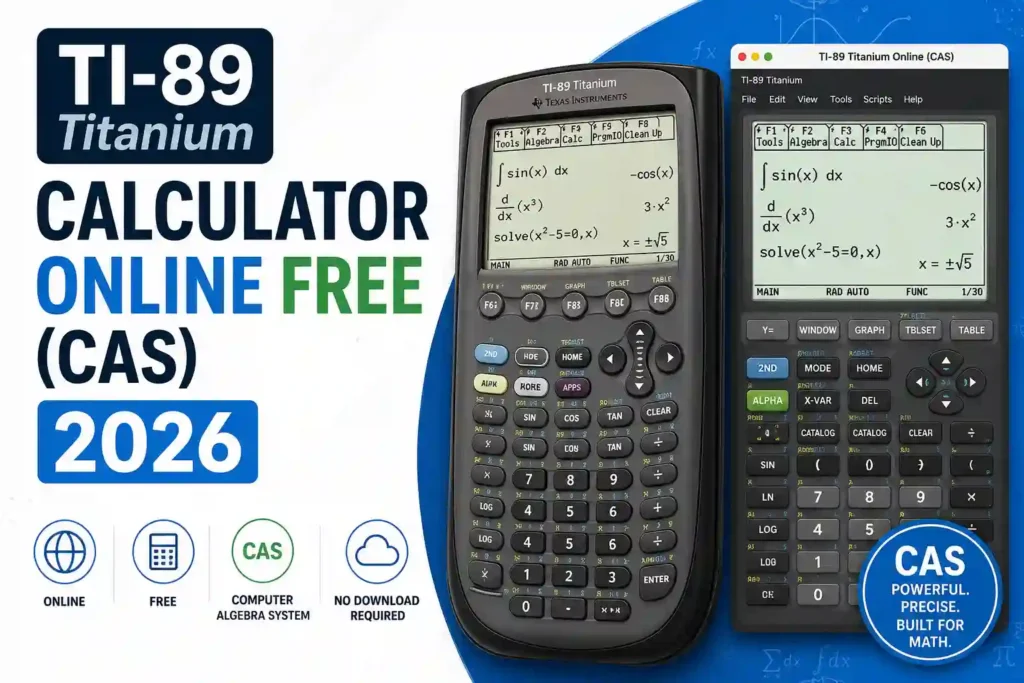
The TI-89 Titanium is a graphing calculator designed for higher-level math. It handles algebra, calculus, statistics, and engineering problems. It also includes a Computer Algebra System, often called CAS.
CAS lets you solve equations with variables, not just numbers. That means you can simplify expressions, take derivatives, and integrate functions exactly.
TI-89 Titanium Graphing Calculator
The TI-89 Titanium is a high-level graphing calculator built for advanced mathematics. It targets students, engineers, and professionals who need symbolic computation, precise graphing, and reliable performance.
It also supports advanced coursework like calculus, differential equations, and engineering math.
Texas Instruments has been making calculators since the 1970s. Over the decades, they have built some of the most trusted math tools in education. The TI-89 Titanium graphing calculator is one of their best achievements.
It was designed for students and professionals who need more than just basic graphing. The TI-89 Titanium sits at the top of the TI graphing calculator lineup, just below the newer TI-Nspire series. But in terms of raw CAS power and exam compatibility, many users still prefer it.
Here is what Texas Instruments built into this machine:
The processor runs at 16 MHz using a Motorola 68000-based chip. That is fast enough to handle complex symbolic calculations without noticeable lag. The 188 KB of RAM handles active calculations and open files. The 2.7 MB of Flash memory stores apps, programs, and archived data. Four AAA batteries power the device, and a backup lithium battery keeps your memory safe when you swap them out.
Texas Instruments also built the TI-89 Titanium with a slide cover to protect the keypad. The keys are well-spaced and have a satisfying tactile click. The build quality is solid. Students have been dropping these in backpacks and lockers for twenty years, and most still work perfectly.
The operating system is user-upgradeable. Texas Instruments releases OS updates through their website. You download TI Connect software to your computer, connect via USB, and install the update. That means your calculator can get better over time, not just sit at factory settings forever.
Texas Instruments also offers customer support, downloadable activities, and classroom resources through their education website. Teachers can find lesson plans built specifically around the TI-89 Titanium. Students can find guidebooks, tutorials, and OS downloads all in one place.
This level of ecosystem support is one reason the Texas Instruments TI-89 Titanium has outlasted many competitors. It is not just a calculator. It is a supported, maintained math platform.
PRODUCT COMPARISON TABLE
| Attribute | TI-89 Titanium Graphing Calculator |
|---|---|
| Type | Graphing calculator with CAS |
| Best For | Calculus, engineering, symbolic math |
| Display | 100 × 160 pixels |
| Memory | 188 KB RAM, 2.7 MB Flash |
| Graphing | 2D, 3D, parametric, polar |
| Programming | TI-Basic and Assembly |
| Connectivity | USB + unit-to-unit linking |
| Power | 4 AAA batteries |
TI-89 Online Simulator vs TI-89 Titanium
If you have searched for a TI-89 online, you may have found web-based simulators or emulators. These tools try to replicate the TI-89 Titanium experience in a browser. They are worth knowing about, but they are not the same thing as the real calculator.
Here is an honest comparison. Ti-84 Calculator :
What the TI-89 Online Simulator Does Well
A browser-based TI-89 simulator can be helpful for:
Some simulators accurately replicate the TI-89’s button layout and basic functions. They are free, which is a clear advantage.
Where the Simulator Falls Short
The biggest problem with any online TI-89 emulator is that it is not exam legal. You cannot bring a browser to a test. No proctor will let you use a laptop or phone during an AP exam or the SAT. So relying only on a simulator is a real risk.
Second, not all simulators are accurate. Some miss edge cases in how the real TI-89 Titanium handles certain calculations. If you learn a workflow on a buggy simulator and then use the real calculator during an exam, you may get confused.
Third, simulators require internet access. The TI-89 Titanium works anywhere. During a power outage, in a remote location, or anywhere offline, your physical calculator keeps working.
Fourth, the tactile experience matters more than people realize. Knowing where the keys are without looking, building muscle memory for the menu system, and getting comfortable with the physical layout all take time. You only get that from the real device.
When an Online Simulator Makes Sense
Use an online TI-89 simulator if:
For anything exam-related, practice on the actual TI-89 Titanium. That is the only way to build real confidence.
The Bottom Line on Simulators
Think of online simulators as a supplement, not a replacement. The TI-89 Titanium is the real tool. The simulator is a preview. Use both wisely.
Texas Instruments TI-89 Graphing Calculator Titanium
The Texas Instruments TI-89 Graphing Calculator Titanium edition brought meaningful upgrades over the original model. Texas Instruments did not just slap a new name on an old device. They rethought the hardware and pushed the platform forward.
Here is what changed and why it matters.
Faster Processing
The Titanium version runs on a 16 MHz processor compared to the 10 MHz chip in the original TI-89. For most calculations, both feel instant. But when you run complex programs, manipulate large matrices, or execute multi-step symbolic computations, the speed difference shows. Programs that took several seconds on the original TI-89 run noticeably faster on the Titanium.
Expanded Flash Memory
The Titanium has 2.7 MB of Flash memory. The original TI-89 had only 702 KB. This difference matters a lot in practice. More memory means you can store more apps, more programs, and more data without constantly managing storage. Students who use their calculator heavily for multiple subjects will appreciate this immediately.
USB Port
This was a major practical upgrade. The original TI-89 used a proprietary link cable for computer connection. The Titanium switched to a standard mini-USB connection. That made syncing with a computer much easier. You can transfer programs, back up data, and update the OS without needing a special adapter.
Updated Industrial Design
The Titanium has a cleaner, more modern look than the original. The color scheme is darker, the finish is smoother, and the slide cover fits more snugly. It looks like something built for serious work, which it is.
Same CAS Engine
The underlying math engine is the same. The CAS functions, the graphing capabilities, the programming language, and the menu structure all carried over. If you learned on an original TI-89, the Titanium will feel familiar immediately. The upgrade is about performance and usability, not a complete redesign.
Preloaded Apps
The TI-89 Graphing Calculator Titanium ships with several preloaded apps, including Cabri Geometry, CellSheet (a spreadsheet tool), Inequality Graphing, NoteFolio, Polynomial Root Finder, Science Tools, StudyCards, and more. These are ready to use out of the box.
The original TI-89 came with fewer preloaded apps. Titanium users got more value right from the start.
Verdict on the Titanium Edition
If you are comparing the two, the Titanium is the clear choice. It is faster, has more storage, connects via USB, and comes with more apps. The price difference between a used original TI-89 and a used Titanium is often small. Always go Titanium when possible.
TI-89 Titanium: Initial Thoughts, Findings, and Gripes
Let us be honest here. The TI-89 Titanium is excellent, but it is not perfect. If you are about to buy one, you deserve a real-world take, not just marketing language.
First Impressions
Unboxing the TI-89 Titanium for the first time, the build quality stands out. It feels solid. The keys have good resistance. The screen is clear and readable. It looks like it was made to last, and it was.
Turning it on for the first time, the home screen is straightforward. But if you expect it to work like a smartphone or a modern app, you will be surprised. The interface is old school in a good way. Every function is accessible through the keypad and menus. There are no touchscreens, no icons to tap, no swipe gestures.
Give it a week. Once the menu layout clicks in your brain, the TI-89 Titanium becomes very fast to use.
What Students Actually Find Useful
After real classroom use, a few features stand out as game changers.
The solve() function saves enormous amounts of time. Instead of solving systems by hand, you input the equations and get the answer. In an exam setting, this lets you check your work in seconds.
The symbolic differentiation and integration tools are accurate and fast. For calculus homework, the ability to verify your manual work against the calculator’s output is incredibly helpful. It teaches you when you made an error and where.
The 3D graphing feature does not get enough credit. Visualizing a surface in three dimensions is something textbook diagrams cannot fully replicate. Once you rotate a 3D graph and see the shape from different angles, the concept becomes much clearer.
Pretty Print mode deserves a mention too. Seeing equations displayed the way they look in a textbook reduces misreading errors. It seems like a small thing until you try working without it.
Real Gripes Worth Knowing
The learning curve is steep. This is the most common complaint from new users. The TI-89 Titanium does not come with an intuitive walkthrough. The manual is dense. Many students feel lost in the first week. This is normal, but it is still frustrating.
The screen is black and white. In 2024, a monochrome screen feels dated. The TI-Nspire CX CAS has a color display. The HP Prime has a color touchscreen. The TI-89 Titanium’s screen is functional and perfectly readable, but it is not modern.
Mode errors trip people up. If you accidentally set the calculator to the wrong mode, results can look wrong. For example, if you are in degree mode instead of radian mode, your trig calculations will be off. New users often do not notice this right away.
Battery life tracking is vague. The TI-89 Titanium does not show a battery percentage. You get a low battery warning when it is nearly dead. Keeping spare AAA batteries in your bag is a good habit.
It is not allowed on all exams. The GRE does not allow the TI-89 Titanium. If you are planning to take the GRE, this calculator will not help you in the exam room, though it is still useful for practice and coursework outside the test.
The price new is high. Around $150 to $200 new is a real commitment. For students already paying tuition and buying textbooks, that stings. The used market helps, but buying used always carries some risk.
Who Should Still Buy It
Despite the gripes, the TI-89 Titanium remains one of the best values in education technology. It does not become obsolete in two years. You will not pay a subscription fee to use it. The CAS engine is among the best ever put into a handheld device.
If you are taking calculus, differential equations, linear algebra, or engineering courses, buy it. Learn the interface before your course starts, not during it. Watch a few YouTube tutorials on the basics. Read the first twenty pages of the manual.
Then use it every day. Within a month, it will feel completely natural. And when exam day comes, you will be glad you put in the work.
Final Verdict
The TI-89 Titanium remains one of the most capable graphing calculators ever made. It focuses on accuracy, symbolic power, and depth. For serious math users, it continues to deliver real results.
References: Texas Instruments Education Technology (education.ti.com), College Board AP Exam Calculator Policy (collegeboard.org), ACT Calculator Policy (act.org), ETS GRE Calculator Policy (ets.org/gre)