
TI-30XS Online Calculator – Free & Fast Simulator
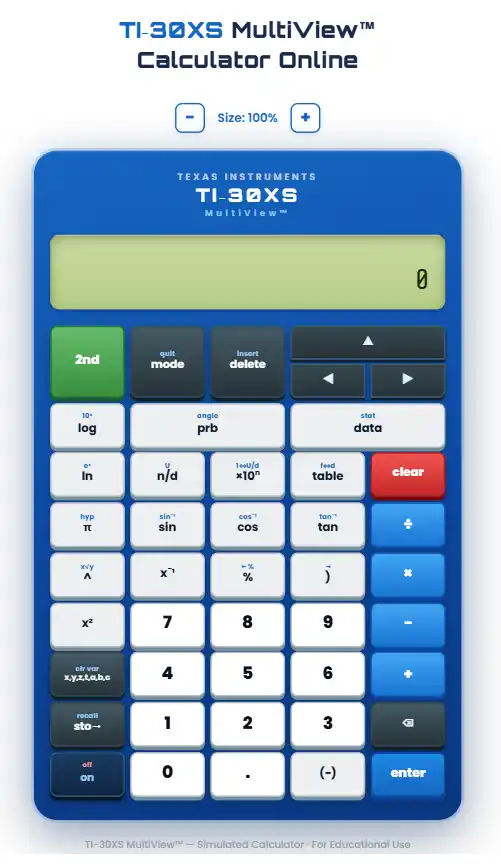
You do not need to carry a physical calculator anymore. The TI-30XS Multiview scientific calculator is now available directly in your browser. Open any device, go to the tool, and start calculating.
No downloads, no sign-ups, no cost.
This guide covers everything you need to know. From what it does, to how to use each feature, to who benefits most from it.
What Is the TI-30XS Calculator Online?
The TI-30XS Multiview is a scientific calculator made by Texas Instruments. It is one of the most widely used calculators in American middle schools, high schools, and standardized tests. The online version is a browser-based simulator. It looks and works like the real device.
Every key, every mode, and every display behavior is replicated. You can use it on a laptop, Chromebook, tablet, or phone. Texas Instruments built this calculator to replace older single-line devices. The four-line display and Math Print technology set it apart from the competition. The online version delivers the same experience, for free, from anywhere.
The physical device retails between $18 and $25 at most stores. The online version costs nothing.
Key Features of the TI-30XS Multiview
MathPrint Display
MathPrint is the standout feature on this calculator. It changes how math looks on your screen.
With MathPrint active, fractions display as stacked fractions. Exponents sit above the base number. Square roots show a proper radical sign. The expression on your screen looks like what you see in a textbook.
This matters more than it sounds. When you read math in a natural format, you make fewer errors. You spot mistakes faster. You spend less time second-guessing your input. Older calculators show everything in a flat, left-to-right string. For example, you might see 3/(4+5) instead of a proper fraction. MathPrint eliminates that problem.
Multi-View Display
The MultiView display shows four lines at once. Most basic scientific calculators show only one or two.
With four lines visible, you can see your current input, the result below it, and two previous calculations above. You do not need to re-enter work. You can scroll through your session history and catch errors from earlier steps.
This is especially useful during tests. You can check your chain of calculations without starting over.
Fraction and Decimal Conversion
The calculator handles fractions natively. Press the n/d key to enter a fraction. The numerator and denominator each get their own input field. After you get a result, press the F to D key. The display switches between the exact fraction and the decimal equivalent. Press it again to go back. The conversion works in both directions.
This is valuable in algebra, chemistry, and physics. Exact values often matter more than rounded decimals. For example, 1/3 is more precise than 0.333.
Table Mode for Function Analysis
Table mode is underused by most students. It is one of the strongest features on this device.
Enter any function using x as the variable. Set a starting value for x and a step size. The calculator generates a complete table of x and f(x) values automatically. Scroll through the rows to study how the function behaves.
This is a fast way to find patterns, verify answers, or explore a function without graphing software. It works well in algebra, precalculus, and statistics.
Trigonometric, Logarithmic, and Exponential Functions
The device includes the full set of scientific functions. Sine, cosine, and tangent are available, along with their inverses. Natural log (ln) and base-10 log are built in. Exponential functions, including e^x, work directly.
Both degree and radian modes are supported. Switch between them in the mode settings. For AP Physics or AP Chemistry, radian mode is frequently required.
Scientific Notation Output
Large and small numbers display in scientific notation when the value exceeds the standard display. The EE key lets you enter values in scientific notation directly.
For example, Avogadro’s number (6.022 x 10^23) can be entered and used in calculations without conversion. This is essential in chemistry and physics coursework.
How to Use the TI-30XS Calculator Online
Starting a Calculation
Open the calculator in your browser. Click or tap a number key to begin. Enter your expression using the on-screen keys. Press ENTER to get the result.
The display shows the expression on the top line and the result below it. Previous entries appear above as you continue working.
Entering Fractions
Press the n/d key. The cursor moves to the numerator field. Type the top number. Press the down arrow to move to the denominator. Type the bottom number. Press the right arrow or ENTER to continue your expression.
The fraction displays in stacked form on screen when MathPrint is active.
Switching Between Fraction and Decimal
After any result, press the F to D key once. The result switches to decimal form. Press it again to return to the fraction. You can toggle back and forth as many times as needed.
Using Table Mode
Press the TABLE key. The calculator asks for a function. Enter it using x as the variable. Set your starting x value. Set the step interval, meaning how much x increases with each row.
The table fills in automatically. Use the arrow keys to scroll through the values. This works for any function you can type on the keypad.
Accessing Second Functions
Many keys have two functions. The primary function is printed on the key face. The secondary function is printed above the key in a different color.
Press the 2nd key first, then the target key. For example, 2nd followed by sin gives you arcsin. 2nd followed by log gives you 10^x.
Using It on Mobile
The online calculator works on phones and tablets. The layout scales to fit your screen. All keys remain tappable. No app download is required.
For smaller screens, landscape orientation often works better. Rotate your phone sideways for a wider view of the keypad and display.
Who Should Use the TI-30XS Calculator Online?
Students
The TI-30XS MultiView is on the approved calculator list for the SAT, PSAT, ACT, and many AP exams, according to College Board and ACT, Inc. guidelines. Students who practice with the online version before test day build real familiarity with the layout and functions.
This tool covers middle school and high school mathematics: fractions, exponents, roots, scientific notation, basic algebra, geometry, trigonometry, and statistics. Students do not need a graphing calculator for most of these subjects. A scientific calculator is the right choice.
Buying a physical device near exam time can be stressful if local stores are sold out. The online version is always available. Use it for daily homework and test preparation without waiting for shipping.
Teachers and Educators
Teachers can open the online version and display it on a projector or share their screen during a virtual lesson. Demonstrating how to enter a fraction or use table mode becomes visual and immediate.
Students who do not own a physical calculator can follow along using the free browser version. This reduces the gap between students who have supplies and those who do not.
The TI-SmartView emulator is a paid option designed for classroom projection. The free online version handles most of the same demonstrations without a licensing fee.
Professionals
Scientists, lab technicians, pharmacists, engineers, and other professionals use scientific calculators for routine work. The online version provides access to all core scientific functions without carrying hardware.
For professionals who already know the layout from school, it works immediately. No learning curve, no setup.
TI-30XS Calculator Online
Who Should Use the TI-30XS? Students, Exams & Professionals
The TI-30XS calculator online is the ideal tool for middle school, high school, and college students preparing for math and science coursework, as well as anyone sitting the SAT, ACT, AP, GED, or IB exams where the physical TI-30XS is an approved device — and beyond students, it is equally valuable for teachers delivering virtual lessons, engineers performing quick field calculations, and professionals in science, finance, and research who need a fast, accurate, and completely free scientific calculator available from any device at any time.
TI-30XS vs. Other Calculators
TI-30XS vs. TI-84 Plus
The TI-84 Plus ec is a graphing calculator. It plots functions visually, runs programs, and handles higher-level mathematics. AP Calculus AB and BC require a graphing calculator. The TI-84 is the most common choice for those courses.
The TI-30XS MultiView is a scientific calculator. It does not produce graphs. For most courses through precalculus, and for most standardized tests outside of calculus, it is sufficient and often the only permitted device.
On the SAT, graphing calculators are allowed but not required. A student with strong scientific calculator skills will not be at a disadvantage.
TI-30XS vs. Basic Scientific Calculators
A basic scientific calculator shows everything on a single line. You enter (3+4)/2 and it displays that flat string as you type.
The TI-30XS MultiView displays the same expression in proper mathematical notation with MathPrint active. This one difference justifies choosing it over a cheaper single-line alternative.
The MultiView also supports table mode, four-line history, and native fraction handling. These features are absent on most basic scientific calculators.
TI-30XS vs. TI-30X IIS
The TI-30X IIS is the older two-line model. It was a meaningful improvement over single-line calculators when it launched. But the MultiView is the current standard.
The newer model adds a four-line display, MathPrint rendering, and table mode. The TI-30X IIS has none of these. For any new purchase or online use, the Multiview is the stronger choice.
Video: Get help with the TI-30XS Calculator Installation
Watch a simple, beginner-friendly video guide to quickly set up and start using the TI-30XS calculator online or emulator without any downloads or technical issues.
This walkthrough ensures you get instant access on mobile or desktop so you can begin solving problems right away without wasting time.
TI 30 Calculator Emulator Online – Guide to TI-30XIIS, TI-30XS Multiview
Explore how the TI-30 calculator emulator works across popular models like TI-30XIIS and TI-30XS Multiview, giving you a real calculator experience directly in your browser.
This guide helps you switch between models, understand key differences, and use each version effectively for exams, homework, or professional calculations.
TI-30XS Multiview Features – What This Calculator Can Do
The TI-30XS MultiView online calculator is packed with advanced features that set it apart from basic scientific calculators, including a four-line display that shows your full expression and result simultaneously, MathPrint™ technology that displays fractions, roots, and exponents exactly as they appear in textbooks, built-in statistics and data analysis tools, fraction-to-decimal conversion, scientific notation, probability functions, and full support for TI-30XIIS and TI-30XA operations — everything a student or professional needs in one clean, fast, browser-based tool.
Benefits of Using the TI-30XS Calculator Online
No Setup, No Cost
Open a browser, navigate to the calculator, and it is ready. There is no account to create, no software to install, and no fee. Full functionality is available immediately.
Works on Any Device
The online version runs on any device with a modern browser. Windows laptops, Macs, Chromebooks, iPhones, Android phones, and tablets all work. You are not tied to a single machine. Switch between your phone and computer without losing any workflow.
No Battery Required
The physical TI-30XS runs on AAA batteries. The online version requires no separate power source. It will not die mid-exam or mid-calculation. TI-30XS Calculator Online For students in long testing sessions and professionals working through the day, this removes a real concern.
Retains Previous Calculations
The multi-view display keeps your recent entries visible during a session. Scroll up to review your last few calculations. This makes it easy to catch an error, compare two results, or trace back through a problem step by step.
Texas Instruments TI-30XS MultiView Scientific Calculator
Runs on solar and battery power; includes a protective cover
TI-30XS Multiview Specifications:
| Feature | Detail |
| Display | 4-line, 16-character LCD |
| MathPrint | Yes |
| Table Mode | Yes |
| Memory Variables | 7 |
| Trig Functions | Sin, cos, tan and inverses |
| Log Functions | Natural log, base-10 log |
| Fraction Support | Native entry and conversion |
| Scientific Notation | Yes, via EE key |
| Degree and Radian Mode | Both supported |
| Exam Approval | SAT, PSAT, ACT, many AP exams |
| Battery (physical) | AAA |
| Dimensions (physical) | 3.3 x 6.7 x 0.35 inches |
| Retail Price (physical) | Approximately $18 to $25 |
Conclusion: Start Using the TI-30XS Calculator Online
The TI-30XS MultiView is a proven tool in American education. Millions of students have used it in classrooms, at home, and on standardized tests. TI-30XS Calculator Online: The online version brings that same tool to any device, for free, with no setup required.
Whether you are working through algebra homework, preparing for the SAT, teaching a virtual lesson, or running a quick scientific calculation at work, this browser-based tool gives you what you need.