TI-84 Plus CE Vernier: The Complete Guide to Texas Instruments’ Most Powerful Graphing Calculator
If you've ever walked into a math or science class, chances are you've seen one — that sleek, colorful device sitting on almost every desk. The TI-84 Plus CE by Texas Instruments isn't just a calculator.
TI-84 Plus CE Calculator online. It's a classroom companion, an exam-day lifeline, and for many students, the first "real" tech tool they ever learn to master.
Whether you're buying one for the first time or upgrading from an older model, this guide covers everything you need to know — from core features and beginner steps to advanced functions and tips for getting the most out of your investment.
Introduction to the TI-84 Plus CE
The Texas Instruments TI-84 Plus CE graphing calculator is the latest evolution in TI's legendary 84 Plus family. It builds on decades of classroom-proven design while adding a high-resolution color display, a rechargeable battery, and a significantly lighter body.
Where older models like the TI-84 Plus Silver Edition felt bulky and dated, the CE feels genuinely modern.
The "CE" in the name stands for Color Edition — and that distinction matters. Color-coded graphs, vibrant imported images as graph backgrounds, and an intuitive interface make solving complex math problems not just easier, but more visually engaging.
Whether you call it the TI-84 Plus CE, the ti84ce, or simply the Texas Instruments calculator TI-84 Plus CE, you're talking about one of the most popular and widely trusted graphing calculators on the market today.
What's New in the TI-84 Plus CE
CE Operating System v5.7.0
The most recent operating system brings meaningful improvements to speed, stability, and functionality. Students working with the TI-84 Plus CE Python edition benefit from built-in Python programming support — a huge deal as Python becomes the go-to language in coding education worldwide.
MathPrint Enhancements
MathPrint lets you enter and view math expressions exactly as they appear in textbooks — fractions look like fractions, exponents sit where they should, and radical signs don't turn into confusing syntax. This alone makes the TI-84 Plus CE graphing calculator far more approachable for beginners than older models.
Python Support
The TI-84 Plus CE Python edition (also called the TI-84 Plus CE T Python Edition in some European markets) allows students to write and run Python scripts directly on the device. This bridges the gap between math education and programming, giving students a two-in-one learning tool. The TI-84 CE Python capability runs a dedicated Python 3-compatible environment, making it genuinely useful for introductory coding courses.
TI-Innovator™ Hub and CellSheet™ Applications
Pre-installed apps extend the calculator's usefulness beyond standard math. The TI-Innovator Hub connects the calculator to external hardware for STEM projects, while CellSheet brings spreadsheet functionality to the device — TI-84 Plus CE Calculator online free, useful for statistics and data analysis without needing a separate computer.
Key Capabilities That Set This Calculator Apart
High-Resolution, Full-Color Backlit Display
The 320 x 240 pixel color screen is a massive upgrade over older TI calculators. Text is sharp, graphs are clear, and color-coding functions make multi-variable problems far easier to interpret at a glance. The backlit display means it's readable in low-light settings — a small but genuinely appreciated feature during late-night study sessions.
Rechargeable TI Battery
Unlike the TI-84 Plus Silver Edition, which runs on AAA batteries, the TI-84 Plus CE Calculator online free uses a built-in rechargeable lithium-ion battery. It charges via a standard TI-84 Plus CE USB cable (mini-USB), and a full charge lasts up to a month of typical classroom use. This eliminates the constant need to buy batteries — a real cost saver over time.
Familiar TI-84 Plus Interface
One of the biggest reasons the TI-84 Plus CE dominates classrooms is continuity. Teachers already know how to teach with it. Students who've used older TI-84 Plus CE Calculator online free models don't face a steep learning curve. The button layout, menu structure, and core functionality are intentionally consistent, making the transition seamless.
Image Import and Utilization
A genuinely fun feature — you can import photos (like a satellite map or a roller coaster photo) as a background for your graph screen, then model real-world curves over them. TI-83 Plus CE: It's a creative teaching tool that makes abstract math feel grounded in reality.
Step-by-Step Usage for Beginners
Never used a graphing calculator before? Here's how to get started with the TI-84 Plus CE calculator from day one.
1. Starting the Calculator
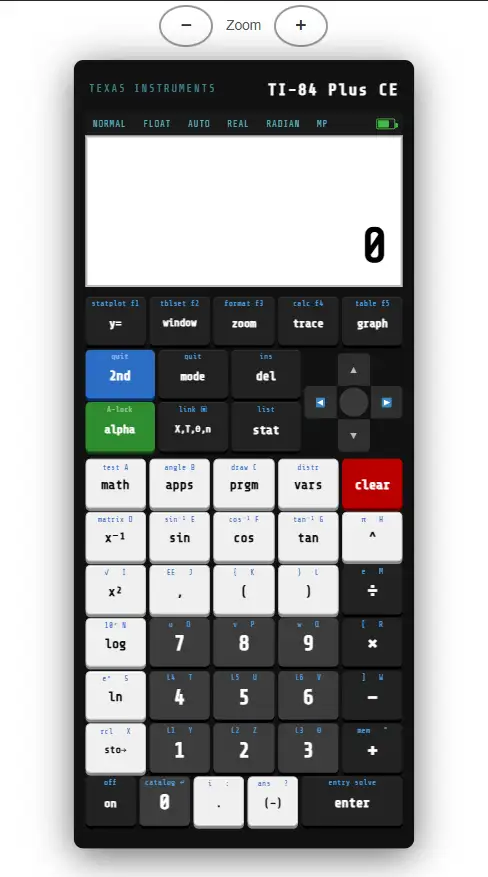
Press the [ON] button at the bottom-left corner. The TI logo appears briefly, then the home screen loads. To adjust contrast or backlight, press [2nd] then the up or down arrow keys.
2. Navigating Menus
Most functions are accessed through menus. Press [MATH], [STAT], [APPS], or other category keys to browse available tools. Use the arrow keys to navigate and [ENTER] to select. Press [2nd] before a key to access its blue secondary function (printed above the key).
3. Graphing an Equation
Press [Y=] to open the equation editor. Type your function — for example, 3X + 2 — and press [GRAPH]. The TI-84 Plus CE color graphing calculator will plot it immediately. You can add multiple functions and distinguish them by color.
4. Using the Table Feature
After entering an equation, press [2nd] + [GRAPH] to open the table of values. This shows X and Y coordinates side by side, making it easy to find key points without manually substituting values.
5. Storing and Recalling Values
Press [STO→] after calculating a value to store it in a variable (A through Z). Recall it later by typing the variable name. This is especially useful for multi-step problems where you reuse the same number repeatedly. TI-84 Plus CE Calculator online free,
TI-84 Plus CE for Classrooms and Exams
Approved Standardized Tests
The TI-84 Plus CE is approved for use on the SAT, ACT, AP exams, and many state standardized tests. When students ask whether the TI-84 Plus CE is ACT approved — yes, it absolutely is, along with the standard TI-84 Plus CE T variant used in some international markets.
Classroom Use
Teachers across the US rely on the Texas Instruments TI-84 Plus CE as their go-to classroom tool because Texas Instruments provides free curriculum resources, activity books, and teacher guides tailored specifically to this model. It supports courses from pre-algebra all the way through AP Calculus, AP Statistics, and beyond.
Advanced Features for Power Users
1. Statistics and Probability Tools
The TI-84 Plus CE has one of the most complete statistics toolsets of any graphing calculator at its price point. Access them through [STAT]:
- EDIT: Enter datasets into lists L1–L6
- CALC: Perform 1-Var Stats, 2-Var Stats, LinReg, QuadReg, and more
- TESTS: Run t-tests, z-tests, chi-square tests, and ANOVA
For AP Statistics students, mastering these menus is non-negotiable — and the TI-84 Plus CE graphing calculator makes them accessible without requiring a statistics software subscription.
2. Matrix Operations
Press [2nd] + [x⁻¹] to access the Matrix menu. You can define matrices up to 99×99 (within memory limits), then perform operations like multiplication, transposition, and finding inverses or determinants. This is invaluable for linear algebra coursework.
3. Programming on the TI-84 Plus CE
The TI-84 Plus CE Python graphing calculator supports two programming environments: the built-in TI-BASIC language and (on Python-enabled models) Python 3. TI-BASIC is straightforward — programs run line by line and can create custom math tools, games, or calculators within the calculator. Community sites like Cemetech host thousands of downloadable programs and games, from useful math utilities to surprisingly polished games like Tetris, Mario, Minecraft clones, and even Donkey Kong for the TI-84 Plus CE Calculator online free.
Memory Management and Reset Options
Checking Memory
Press [2nd] + [+] to open the Memory menu. "Check RAM" shows how much free RAM you have. The TI-84 Plus CE comes with 154KB of RAM and 3MB of user-accessible archive (storage) memory — considerably more than older models.
Resetting the Calculator
If your calculator is behaving unexpectedly, a reset often fixes it. Go to [2nd] + [+] → "7: Reset." You can reset RAM only (clears variables and programs but keeps OS), or perform a full factory reset. Back up important programs to a computer using TI Connect CE software before resetting.
Troubleshooting Common Problems
Calculator Won't Turn On
First, check that the battery has charge — connect the TI-84 Plus CE USB cable to a computer or wall adapter and charge for at least 30 minutes. If it still won't turn on, try a soft reset by removing the backup battery cover on the back and briefly disconnecting the small round backup battery.
Graph Not Displaying
If pressing [GRAPH] shows a blank screen, check your window settings with [WINDOW]. The Xmin/Xmax and Ymin/Ymax values may not include your function's visible range. Press [ZOOM] → "6: ZStandard" to reset to a default view.
Keys Not Responding
Sticky or unresponsive keys are often caused by debris under the keypad. Gently clean around the keys with compressed air. If a key is physically damaged, Texas Instruments offers a warranty repair service.
Comparing the Physical TI-84 Plus CE with Online Versions
With the rise of TI-84 Plus CE online emulators and calculators, some students wonder whether they really need the physical device. Here's the honest comparison:
TI-84 Plus CE Physical Device: TI-84 Plus CE Calculator online free
TI-84 Online Calculator:
If you're preparing for the SAT, ACT, or AP exams, the physical Texas Instruments TI-84 Plus CE graphing calculator is essential. Online tools work as supplements, not replacements.
Accessories and Connectivity
The TI-84 Plus CE uses a mini-USB port for charging and data transfer. The included TI-84 Plus CE USB cable also allows you to:
If you need a replacement cable, any standard mini-USB cable works — available on Amazon, Best Buy, Staples, and Target.
TI-84 Plus CE Colors and Pricing
One reason the TI-84 Plus CE has become culturally iconic among students is the range of colors available. Beyond standard black, you can find it in:
- Pink (a perennial favorite — the pink TI-84 Plus CE consistently ranks among top sellers)
- Mint green (popular for its fresh, modern look)
- Purple
- Blue
- Red (including the Radical Red edition)
- White
- Teal
- Galaxy Gray
The TI-84 Plus CE price typically ranges from $90 to $150 new, depending on the retailer and color. You can often find the TI-84 Plus CE used on eBay or Amazon for $50–$80 in good condition — a solid option for budget-conscious students. Retailers like Best Buy, Target, Staples, and Amazon all carry the Texas Instruments TI-84 Plus CE with occasional sales, especially around back-to-school season.
Comparing the TI-84 Plus CE with Other TI Models
| Model | Display | Battery | Python | Price Range |
| TI-84 Plus CE | Full color | Rechargeable | Optional | $90–$150 |
| TI-84 Plus Silver Edition | Monochrome | AAA batteries | No | $60–$90 (used) |
| TI-Nspire CX II | Full color | Rechargeable | Yes | $130–$170 |
| TI-89 Titanium | Monochrome | AAA batteries | No | $100–$150 |
For most high school students, the TI-84 Plus CE hits the sweet spot — powerful enough for AP coursework, affordable relative to more advanced models, and universally accepted on standardized tests.
Memory, Storage, and the Future of TI Calculators
The TI-84 Plus CE supports program downloads that expand its capabilities dramatically. From the Cesium file manager (which gives the calculator an iOS-style app launcher) to complex games and specialized math apps, the community around this device is extraordinarily active for a piece of hardware that's fundamentally a classroom tool.
Texas Instruments has continued to update the operating system, add Python support, and refine the hardware — signaling that the TI-84 CE family still has a meaningful future in education even as tablet-based tools grow in popularity.
Tips for Battery Maintenance
Final Note for Students and Teachers
The TI-84 Plus CE isn't just a tool — it's an investment in mathematical fluency. Learning to use it well takes time, but the payoff is significant. Students who genuinely know their way around a TI-84 Plus CE graphing calculator have a measurable advantage on standardized tests, in science courses, and in early college coursework.
For teachers, the consistency of the TI-84 platform across decades of students means that expertise built once transfers to every class, every year. The Texas Instruments TI-84 Plus CE is, simply put, the most battle-tested graphing calculator in American education — and it continues to earn that reputation with every update.
Whether you pick it up at Best Buy, order the TI-84 Plus CE on Amazon, find a deal on eBay, or grab one at Staples, you're getting a calculator that will carry you through years of math, science, and standardized testing. Choose your color, charge it up, and get to work.